
Cozy Survival Greenhouse! - Downloads and Blueprints pdf
Creator: DioRods · 2026-09-14 · Maps · Free on Eaglercraft Studio
Download Cozy Survival Greenhouse! - Downloads and Blueprints pdf — free Minecraft map. Created by DioRods. Tagged cottage, cottagecore, cozy, diorods. Get the world/schematic file when available and explore more free maps on Eaglercraft Studio.
Creator notes
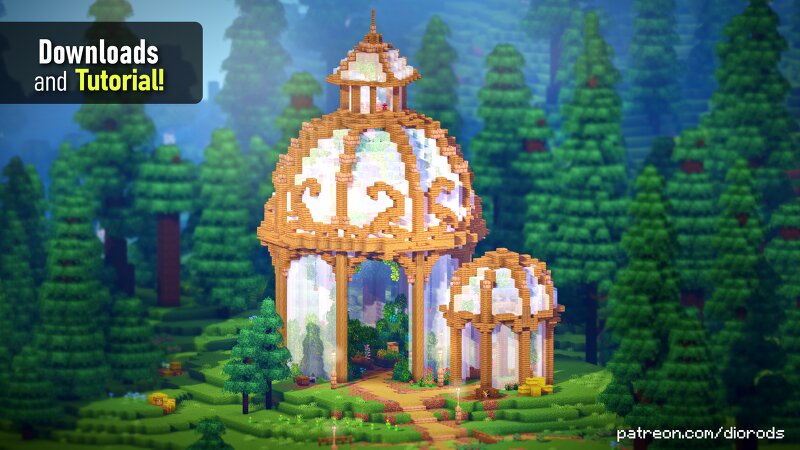
Bring a little more life to your survival world with this large, cozy Minecraft greenhouse ! 🌱✨ Designed as a peaceful farming and gardening space, this build is perfect for anyone who loves detailed survival builds , cozy interiors, and a touch of cottagecore. Here are all the files included! World Save File - Java (1.21.10) World Save File - Bedrock (1.21.10) 2D Blueprints for Most Builds! - Tutorial PDFs Litematic Schematics World Edit Schematics 🌱 Build Features Large greenhouse with a cozy design Great for Minecraft survival Space for crops, flowers, and plants Detailed interior and exterior Perfect for farming and gardening Cozy / cottagecore inspired aesthetic Great addition to a survival base Plenty of room to customize and decorate If you enjoy Minecraft building, survival bases, farming builds, cozy Minecraft houses, cottagecore builds, and detailed interiors , I hope this greenhouse gives you some inspiration for your own world! 🌿 Build it, decorate it, and make it your own! 🌿 If you do use my builds for project, make sure to credit me. Do not redistribute or resell my builds!
Added value
What’s included on this page
Preview, categories, compatibility, and tools on this page — not a bare file mirror.
- Creator
- DioRods
- Source
- Minecraft downloads library on Eaglercraft Studio
- Type
- Minecraft map / world
- Price
- Free download on Eaglercraft Studio
- Curation
- Listed with credit to DioRods · studio preview & install guide
- Compatible with
- Minecraft Java (match version / loader in facts)
- Tags
- Cottage, Cottagecore, Cozy, Diorods, Easy, Elven
Install guide
How to install this free Minecraft map
Eaglercraft Studio map listing with preview, creator credit, and install steps for Java worlds.
- 1Download the world archive (.zip / .mcworld / schematic) when available.
- 2For Java: extract into your .minecraft/saves folder (or import via your launcher).
- 3Launch Minecraft, select the world, and play. Keep a backup before overwriting saves.
Check any version notes in the facts panel — maps often target a specific Minecraft release.
Related free maps
More curated maps from the same library section.

CraftyFoxe · 761 diamonds · 418 views

CraftyFoxe · 761 diamonds · 339 views

CraftyFoxe · 761 diamonds · 319 views

CraftyFoxe · 761 diamonds · 306 views