
Cpvp Arena
Creator: NoobGamerz125 · 2026-08-30 · Maps · Free on Eaglercraft Studio
Download Cpvp Arena — free Minecraft map. Created by NoobGamerz125. Tagged arena, bestarena, boxpvp, ffa. Get the world/schematic file when available and explore more free maps on Eaglercraft Studio.
Creator notes
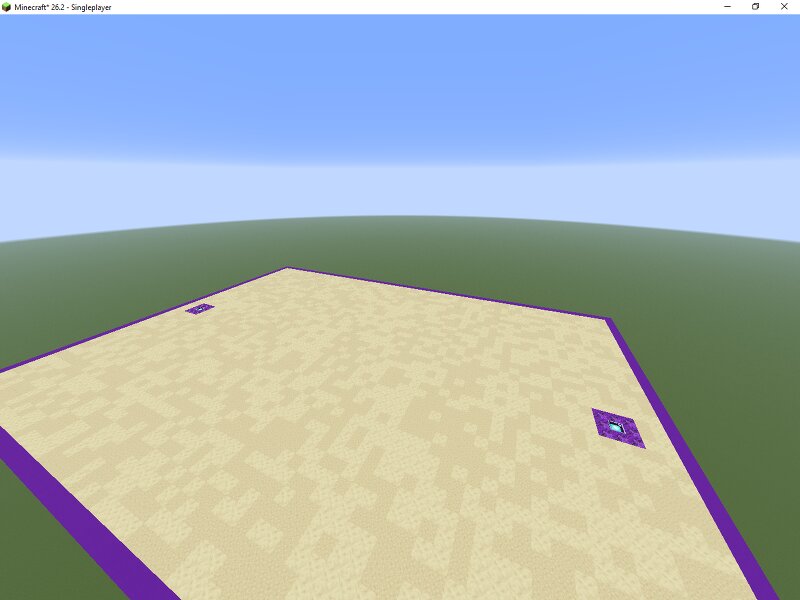
🔮 The Ultimate Crystal PvP (CPvP) Arena | Explosive Combat Map Get ready for the most intense and explosive fights on your server! Welcome to the Ultimate CPvP Arena , a flat-ground battleground engineered specifically for high-tier Crystal PvP, Anchor PvP, and Totem PvP gameplay.Unlike regular PvP arenas, CPvP requires wide-open spaces, high frame rates, and high-contrast flooring to track crystal placements instantly. This map delivers exactly that! 🌟 Key Features & Design Elements CPvP Optimized Flooring: The main arena floor uses a light, clean sand/endstone textured palette. This ensures that obsidian blocks and glowing End Crystals stand out clearly during fast-paced fights. Respawn Anchor & Beacon Stations: Strategically built into the sides are dedicated purple platforms equipped with beacons/anchors. These add a tactical element for anchor-charging or spawning setups. Secure Purple Borders: Marked with a striking purple outline, the arena keeps the combat contained so players can't easily run away or drag out the match indefinitely. Maximum FPS for Fast Mechanics: No useless decorations, trees, or micro-blocks that cause micro-stutters. Your hits, crystal wraps, and totem
Added value
What’s included on this page
Preview, categories, compatibility, and tools on this page — not a bare file mirror.
- Creator
- NoobGamerz125
- Source
- Minecraft downloads library on Eaglercraft Studio
- Type
- Minecraft map / world
- Price
- Free download on Eaglercraft Studio
- Curation
- Listed with credit to NoobGamerz125 · studio preview & install guide
- Compatible with
- Minecraft Java (match version / loader in facts)
- Tags
- Arena, Bestarena, Boxpvp, Ffa, Lifesteal, Lobby
Install guide
How to install this free Minecraft map
Eaglercraft Studio map listing with preview, creator credit, and install steps for Java worlds.
- 1Download the world archive (.zip / .mcworld / schematic) when available.
- 2For Java: extract into your .minecraft/saves folder (or import via your launcher).
- 3Launch Minecraft, select the world, and play. Keep a backup before overwriting saves.
Check any version notes in the facts panel — maps often target a specific Minecraft release.
Related free maps
More curated maps from the same library section.

CraftyFoxe · 761 diamonds · 418 views

CraftyFoxe · 761 diamonds · 339 views

CraftyFoxe · 761 diamonds · 319 views

CraftyFoxe · 761 diamonds · 306 views