
Create Integration factory 2.0
Creator: SnSilent · 2026-09-10 · Maps · Free on Eaglercraft Studio
Download Create Integration factory 2.0 — free Minecraft map. Created by SnSilent. Tagged create, factory, other. Get the world/schematic file when available and explore more free maps on Eaglercraft Studio.
Creator notes
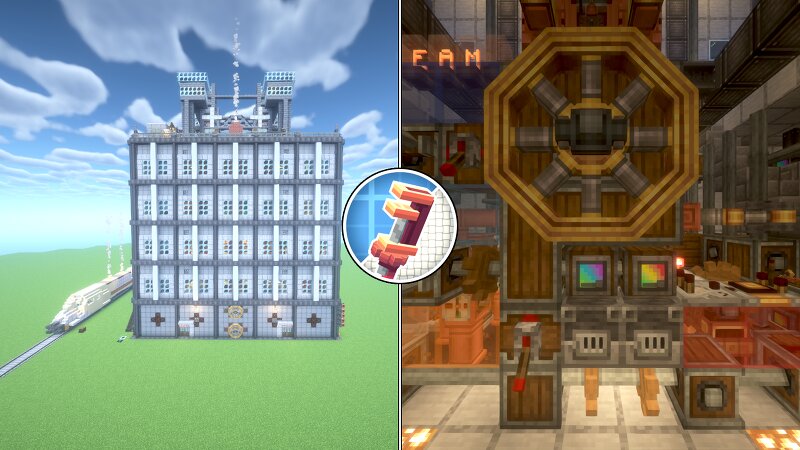
Due to my own needs, I built a Create factory, This factory integrates various functions. The factory has a total of 7 floors, including underground and rooftop, with a warehouse located underground The first floor can access warehouse items and has an automatic Precision Mechanism The second floor is equipped with stone machines and Basalt machines The third floor is used for village transactions, furnace groups, carpets, and Golem machines The fourth floor is the crop planting area The fifth floor is the animal breeding area On the rooftop are IronGolem Tower and WhiteSail Generator There is a train next to the factory that imitates GTA5. The second carriage of the train is for passengers, the third carriage is Fluid Tank, and the fourth carriage is Item Vault. Save Version:Java1.20.1 Essential Mod: Create: modrinth.com/mod/create-fabric/versions?l=fabric The mod I am using is Fabric, and Forge may not necessarily work. Old Factory
Added value
What’s included on this page
Preview, categories, compatibility, and tools on this page — not a bare file mirror.
- Creator
- SnSilent
- Source
- Minecraft downloads library on Eaglercraft Studio
- Type
- Minecraft map / world
- Price
- Free download on Eaglercraft Studio
- Curation
- Listed with credit to SnSilent · studio preview & install guide
- Compatible with
- Minecraft Java (match version / loader in facts)
- Tags
- Create, Factory, Other
Install guide
How to install this free Minecraft map
Eaglercraft Studio map listing with preview, creator credit, and install steps for Java worlds.
- 1Download the world archive (.zip / .mcworld / schematic) when available.
- 2For Java: extract into your .minecraft/saves folder (or import via your launcher).
- 3Launch Minecraft, select the world, and play. Keep a backup before overwriting saves.
Check any version notes in the facts panel — maps often target a specific Minecraft release.
Related free maps
More curated maps from the same library section.

CraftyFoxe · 761 diamonds · 418 views

CraftyFoxe · 761 diamonds · 339 views

CraftyFoxe · 761 diamonds · 319 views

CraftyFoxe · 761 diamonds · 306 views