
Curvy Fairy Statues!
Creator: BSLBuilds · 2026-09-29 · Maps · Free on Eaglercraft Studio
Download Curvy Fairy Statues! — free Minecraft map. Created by BSLBuilds. Tagged butterfly, butterflywings, decorate, fairy. Get the world/schematic file when available and explore more free maps on Eaglercraft Studio.
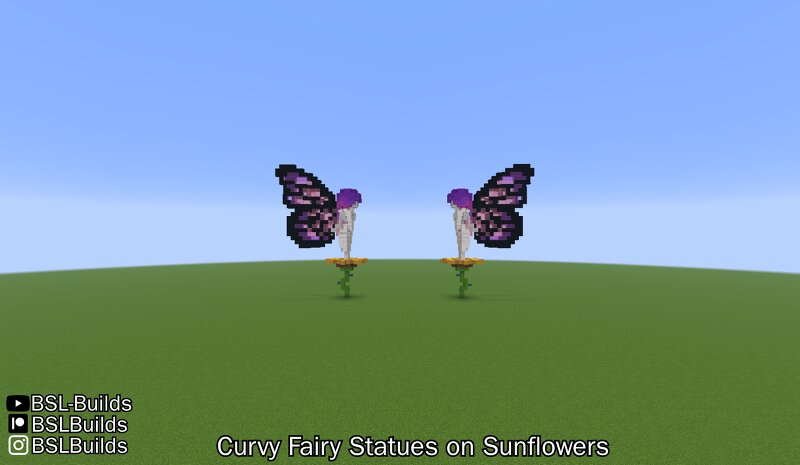
Creator notes
Hi! I am currently working in a pink and white castle for my patrons because this building was the winner of our first poll. I made these statues to decorate the surroundings of the castle that is yet to come. I was struggling a lot to make these statues so I invited few patrons and friends of mine to be live jury and assist me with hair coloring, type of block composition for the body, and adding few details. 100% Survival friendly: Uses no creative-mode only blocks nor require use of commands! Uses 26.3 new concrete slabs for hair composition: Hair can be swapped for other kind of blocks with matching slab kinds. In case you are planning to build this from older versions. Download includes the main version of the statue, which has a gradient of purple->magenta->pink concrete and wool; includes the gallery including the main version, pink haired, purple haired, magenta haired, blonde haired, brown haired, and orange haired versions. Includes the two main versions, ontop of sunflowers, facing each other. Sunflower model inspired from: https://www.planetminecraft.com/project/build-battle-sunflower/ If you are interested into supporting me, participate into new upcoming polls to deci
Added value
What’s included on this page
Preview, categories, compatibility, and tools on this page — not a bare file mirror.
- Creator
- BSLBuilds
- Source
- Minecraft downloads library on Eaglercraft Studio
- Type
- Minecraft map / world
- Price
- Free download on Eaglercraft Studio
- Curation
- Listed with credit to BSLBuilds · studio preview & install guide
- Compatible with
- Minecraft Java (match version / loader in facts)
- Tags
- Butterfly, Butterflywings, Decorate, Fairy, Fairystatue, Garden
Install guide
How to install this free Minecraft map
Eaglercraft Studio map listing with preview, creator credit, and install steps for Java worlds.
- 1Download the world archive (.zip / .mcworld / schematic) when available.
- 2For Java: extract into your .minecraft/saves folder (or import via your launcher).
- 3Launch Minecraft, select the world, and play. Keep a backup before overwriting saves.
Check any version notes in the facts panel — maps often target a specific Minecraft release.
Related free maps
More curated maps from the same library section.

CraftyFoxe · 761 diamonds · 418 views

CraftyFoxe · 761 diamonds · 339 views

CraftyFoxe · 761 diamonds · 319 views

CraftyFoxe · 761 diamonds · 306 views