
Custom Gothic Cathedral
Creator: KrodoFox · 2026-09-26 · Maps · Free on Eaglercraft Studio
Download Custom Gothic Cathedral — free Minecraft map. Created by KrodoFox. Tagged altar, arch, arches, castle. Get the world/schematic file when available and explore more free maps on Eaglercraft Studio.
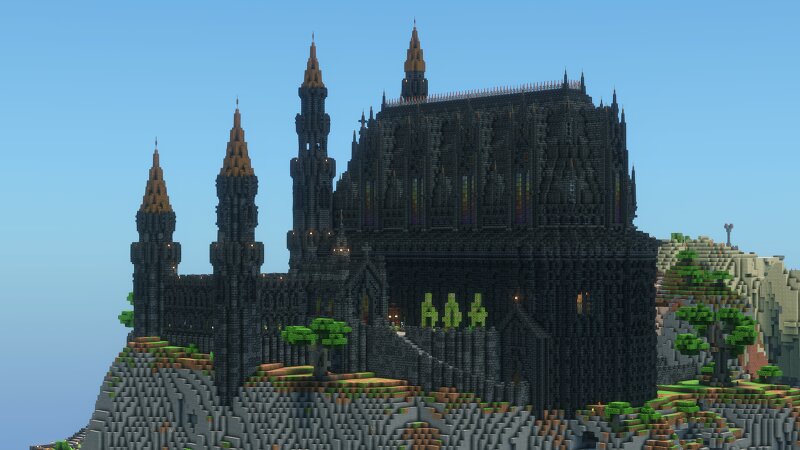
Creator notes
It started out as a castle I built long ago as a spawn for an SMP server, which I later converted into a Christian church for an event organized with friends. The outside of Cathedral and and rest of the map was built in normal vanilla Minecraft but the inside of it was mostly built with mods like Create Copycats and Frame blocks.
Added value
What’s included on this page
Preview, categories, compatibility, and tools on this page — not a bare file mirror.
- Creator
- KrodoFox
- Source
- Minecraft downloads library on Eaglercraft Studio
- Type
- Minecraft map / world
- Price
- Free download on Eaglercraft Studio
- Curation
- Listed with credit to KrodoFox · studio preview & install guide
- Compatible with
- Minecraft Java (match version / loader in facts)
- Tags
- Altar, Arch, Arches, Castle, Christian, Church
Install guide
How to install this free Minecraft map
Eaglercraft Studio map listing with preview, creator credit, and install steps for Java worlds.
- 1Download the world archive (.zip / .mcworld / schematic) when available.
- 2For Java: extract into your .minecraft/saves folder (or import via your launcher).
- 3Launch Minecraft, select the world, and play. Keep a backup before overwriting saves.
Check any version notes in the facts panel — maps often target a specific Minecraft release.
Related free maps
More curated maps from the same library section.

CraftyFoxe · 761 diamonds · 418 views

CraftyFoxe · 761 diamonds · 339 views

CraftyFoxe · 761 diamonds · 319 views

CraftyFoxe · 761 diamonds · 306 views