
Custom Spruce Trees Asset Pack
Creator: Bealzechan · 2026-09-24 · Maps · Free on Eaglercraft Studio
Download Custom Spruce Trees Asset Pack — free Minecraft map. Created by Bealzechan. Tagged assets, forest, organic, tree. Get the world/schematic file when available and explore more free maps on Eaglercraft Studio.
Creator notes
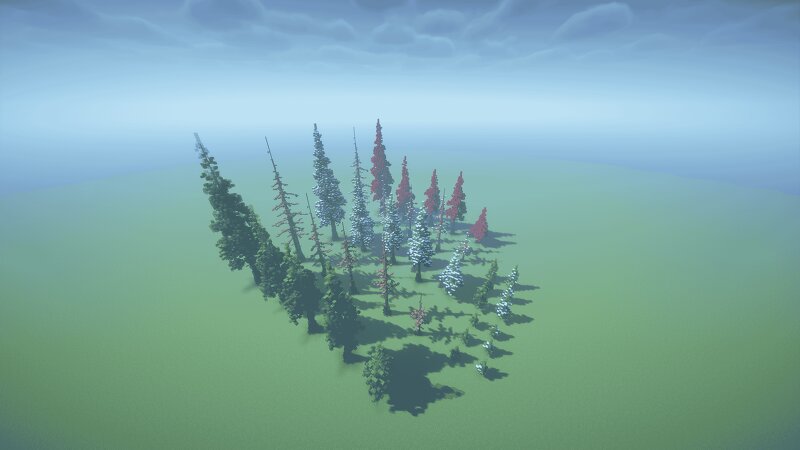
This pack has 38 high quality Axiom Blueprints, access to the Java world download, and Worldedit Schematics for each and every tree. Within this pack are: - 5 Custom spruce trees - 5 Dead (or skeletonized) versions of the custom spruce trees - 5 Custom winter/snowy versions of the spruce trees - 5 Dead (or skeletonized) winter/snowy versions of the custom spruce trees - 5 Spruce trees with the leaves swapped for one block type for easy customization - 3 Small custom spruce saplings - 3 Winterized small custom spruce saplings - 3 Large custom spruce saplings - 3 Large custom winterized spruce saplings Everything within this pack was made on 1.21.11. Any other versions, especially earlier ones, may cause issues. If you have any questions, problems with the pack, or want to reach out for whatever reason please feel free to! You can message me directly through Patreon and I will do my best to get back to you in a timely manner. If you are using these builds outside of personal projects, such as on servers, please note somewhere the builder who made them. Recognition is appreciated. Enjoy your assets! :)
Added value
What’s included on this page
Preview, categories, compatibility, and tools on this page — not a bare file mirror.
- Creator
- Bealzechan
- Source
- Minecraft downloads library on Eaglercraft Studio
- Type
- Minecraft map / world
- Price
- Free download on Eaglercraft Studio
- Curation
- Listed with credit to Bealzechan · studio preview & install guide
- Compatible with
- Minecraft Java (match version / loader in facts)
- Tags
- Assets, Forest, Organic, Tree
Install guide
How to install this free Minecraft map
Eaglercraft Studio map listing with preview, creator credit, and install steps for Java worlds.
- 1Download the world archive (.zip / .mcworld / schematic) when available.
- 2For Java: extract into your .minecraft/saves folder (or import via your launcher).
- 3Launch Minecraft, select the world, and play. Keep a backup before overwriting saves.
Check any version notes in the facts panel — maps often target a specific Minecraft release.
Related free maps
More curated maps from the same library section.

CraftyFoxe · 761 diamonds · 418 views

CraftyFoxe · 761 diamonds · 339 views

CraftyFoxe · 761 diamonds · 319 views

CraftyFoxe · 761 diamonds · 306 views