
Custom War My first Minecraft Map!!!
Creator: Stainless · 2026-09-18 · Maps · Free on Eaglercraft Studio
Download Custom War My first Minecraft Map!!! — free Minecraft map. Created by Stainless. Tagged other. Get the world/schematic file when available and explore more free maps on Eaglercraft Studio.
Creator notes
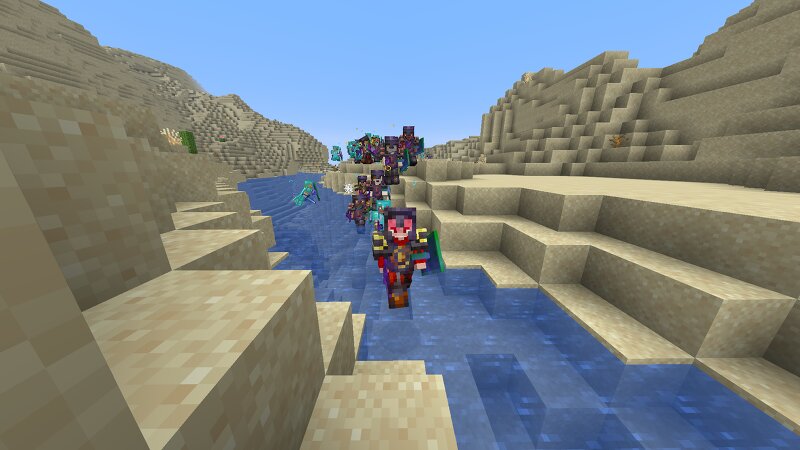
My first Minecraft map is a large and highly customisable war simulator set in a massive desert. The main idea behind the map is to give players the freedom to create their own battles and scenarios instead of forcing them to follow one specific story. I wanted to make something that could be played again and again while still feeling different each time. The map is made up of a huge desert with rivers running through it, villages spread across the landscape, and large hills that give the environment more variety. These features are not only there to make the map look interesting, but can also become important parts of the battles that players create. The desert is the main environment of the map. It gives the battlefield a large, open feeling and provides plenty of space for armies to move around. There are areas where players can set up large battles without being restricted by buildings or other obstacles. The open desert can also make armies easier to see from a distance, creating a completely different experience from fighting in a forest or a city. At the same time, the desert is not completely flat or empty. The rivers, villages, and hills break up the landscape and give pla
Added value
What’s included on this page
Preview, categories, compatibility, and tools on this page — not a bare file mirror.
- Creator
- Stainless
- Source
- Minecraft downloads library on Eaglercraft Studio
- Type
- Minecraft map / world
- Price
- Free download on Eaglercraft Studio
- Curation
- Listed with credit to Stainless · studio preview & install guide
- Compatible with
- Minecraft Java (match version / loader in facts)
- Tags
- Other
Install guide
How to install this free Minecraft map
Eaglercraft Studio map listing with preview, creator credit, and install steps for Java worlds.
- 1Download the world archive (.zip / .mcworld / schematic) when available.
- 2For Java: extract into your .minecraft/saves folder (or import via your launcher).
- 3Launch Minecraft, select the world, and play. Keep a backup before overwriting saves.
Check any version notes in the facts panel — maps often target a specific Minecraft release.
Related free maps
More curated maps from the same library section.

CraftyFoxe · 761 diamonds · 418 views

CraftyFoxe · 761 diamonds · 339 views

CraftyFoxe · 761 diamonds · 319 views

CraftyFoxe · 761 diamonds · 306 views