
Dark Vampire City
Creator: T17N · 2026-09-07 · Maps · Free on Eaglercraft Studio
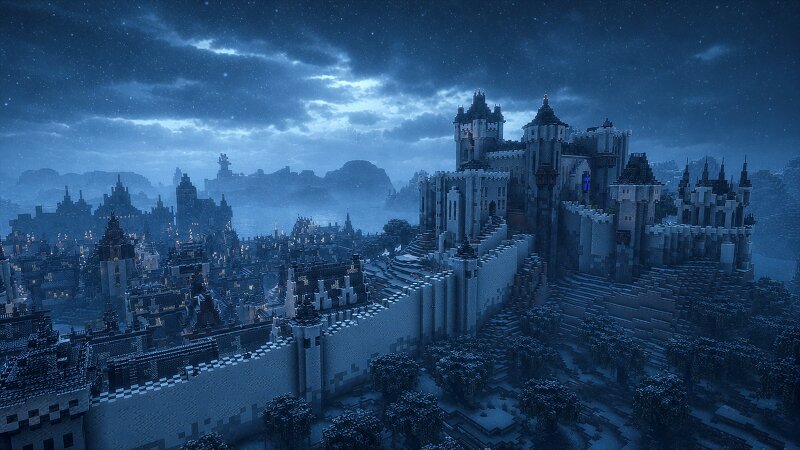
Download Dark Vampire City — free Minecraft map. Created by T17N. Tagged capital, castle, city, gothic. Get the world/schematic file when available and explore more free maps on Eaglercraft Studio.
Creator notes
The city of Badihr was founded over a thousand years ago by Macrath and is considered one of the oldest cities on Planet Spero. What began as a small settlement has grown into a vast gothic metropolis, known for its dark architecture and towering walls. Within those walls live the wealthy and noble families of the Icelands of Dripith, while beyond them lie villages, the harbor, and sprawling slums. Although the city appears well protected, a far greater danger lurks beneath its streets. Deep underground are the ancient vampire dungeons, where vampires sleep during the day and emerge at night to hunt. Many citizens believe garlic wards them off, leading countless homes to display it near their windows, though its effectiveness is doubtful. As darkness falls, fear grips the city. Ordinary people lock themselves indoors while the feared Vampire Hunters patrol the streets. Over centuries, vampires have evolved to look nearly identical to humans, with only their glowing red eyes revealing their true nature. In their relentless pursuit of these creatures, the Vampire Hunters often burn suspected vampires at the stake. Sometimes they uncover a monster, but many innocents have met the same
Added value
What’s included on this page
Preview, categories, compatibility, and tools on this page — not a bare file mirror.
- Creator
- T17N
- Source
- Minecraft downloads library on Eaglercraft Studio
- Type
- Minecraft map / world
- Price
- Free download on Eaglercraft Studio
- Curation
- Listed with credit to T17N · studio preview & install guide
- Compatible with
- Minecraft Java (match version / loader in facts)
- Tags
- Capital, Castle, City, Gothic, Medieval, Other
Install guide
How to install this free Minecraft map
Eaglercraft Studio map listing with preview, creator credit, and install steps for Java worlds.
- 1Download the world archive (.zip / .mcworld / schematic) when available.
- 2For Java: extract into your .minecraft/saves folder (or import via your launcher).
- 3Launch Minecraft, select the world, and play. Keep a backup before overwriting saves.
Check any version notes in the facts panel — maps often target a specific Minecraft release.
Related free maps
More curated maps from the same library section.

CraftyFoxe · 761 diamonds · 418 views

CraftyFoxe · 761 diamonds · 339 views

CraftyFoxe · 761 diamonds · 319 views

CraftyFoxe · 761 diamonds · 306 views