
DEARRON Class Fast Attack Destroyer (Frontier)
Creator: guardian1200 · 2026-08-31 · Maps · Free on Eaglercraft Studio
Download DEARRON Class Fast Attack Destroyer (Frontier) — free Minecraft map. Created by guardian1200. Tagged destroyer, fleet, frontier, interstellar. Get the world/schematic file when available and explore more free maps on Eaglercraft Studio.
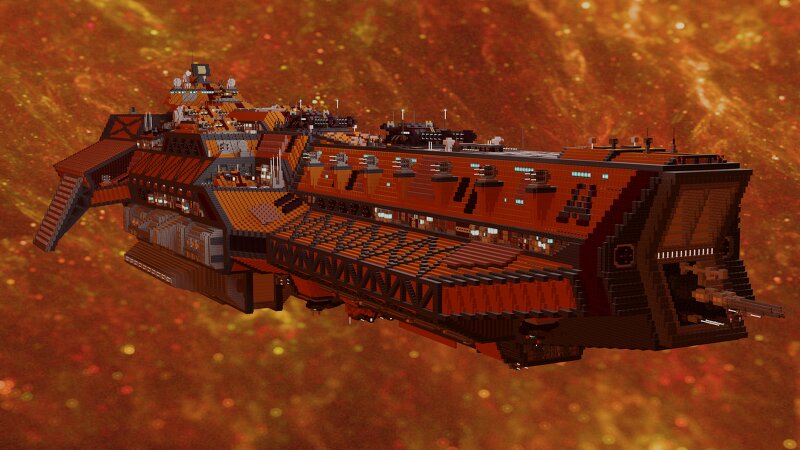
Creator notes
the dearron class developed by the frontier in 2356 and commisioned in 2359, dearron is an attack destroyer and a frontline vessel as most of its guns located in the forward posision,its also has the ability to land on surfaces and deploy troop divisions. it was designed as a troop carrying vessel for specific mission but also a dangerous warship as it carries 2 dual 1350mm railgun turrets ,which they are unforgiving by punching deep and big holes into enemy vessels. dearron is a very dangerous destroyer and can provide air defence support but it doent carry any fighters. entered service:2359 in service:75 crew:421 personel +3000 troops +10 creeper light warmech characteristics: lenght:374/393 with antennas width:121 height:87 speed:1136 km/h in atmosphere armament: 2x2 1350mm heavy railgun turrets 3x2 650mm medium ion turrets 4x6 280mm medium pulse laser turrets 2x4 230mm pulse laser/air defence medium turrets 4x4 200mm pulse laser/air defence medium turrets 27x4 50mm pulse laser point defence stations 15x12 VLS12 (can use different types of missiles) egines: 3 medium warpdrive engines 2 light warpdrive engines 4 medium FTL jumper engines 8 heavy ion thrusters 12 medium ion thrust
Added value
What’s included on this page
Preview, categories, compatibility, and tools on this page — not a bare file mirror.
- Creator
- guardian1200
- Source
- Minecraft downloads library on Eaglercraft Studio
- Type
- Minecraft map / world
- Price
- Free download on Eaglercraft Studio
- Curation
- Listed with credit to guardian1200 · studio preview & install guide
- Compatible with
- Minecraft Java (match version / loader in facts)
- Tags
- Destroyer, Fleet, Frontier, Interstellar, Military, Navy
Install guide
How to install this free Minecraft map
Eaglercraft Studio map listing with preview, creator credit, and install steps for Java worlds.
- 1Download the world archive (.zip / .mcworld / schematic) when available.
- 2For Java: extract into your .minecraft/saves folder (or import via your launcher).
- 3Launch Minecraft, select the world, and play. Keep a backup before overwriting saves.
Check any version notes in the facts panel — maps often target a specific Minecraft release.
Related free maps
More curated maps from the same library section.

CraftyFoxe · 761 diamonds · 418 views

CraftyFoxe · 761 diamonds · 339 views

CraftyFoxe · 761 diamonds · 319 views

CraftyFoxe · 761 diamonds · 306 views