
DFC COMPLEX LEAFIAS ADDON
Creator: User6701128G · 2026-09-12 · Maps · Free on Eaglercraft Studio
Download DFC COMPLEX LEAFIAS ADDON — free Minecraft map. Created by User6701128G. Tagged other. Get the world/schematic file when available and explore more free maps on Eaglercraft Studio.
Creator notes
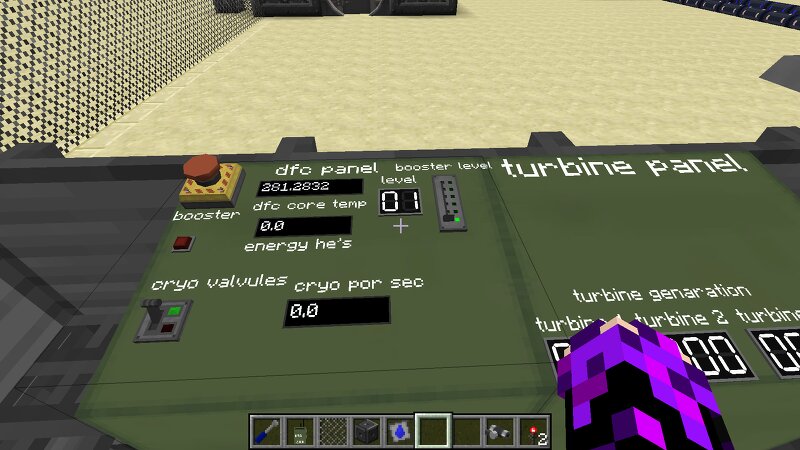
DFC Fusion Reactor Complex - Advanced Automation & Control Room 🛠️ Key Features: Custom Control Panel Room: A beautifully designed, retro-industrial control center featuring real-time telemetry. Dynamic Node Logic Programming: The control room utilizes complex internal logic circuits. It no have features a manual SCRAM Emergency Button (Fail-Safe), customizable Square Dial analog gauges for core performance, and multi-digit Seven Segment Displays for the DFC Booster levels (toggling from 01 to 64 and scaling dynamically up to level 14+). Massive Power Generation: The DFC's ultra-high pressure steam output is channeled into 3 massive industrial steam turbines , generating well over 1.1+ Million HE/s under peak booster load. The "infinite battery " Energy Vault: A massive subterranean battery storage room featuring custom textures from Leafia's addon to safely buffer and distribute millions of Heavy Electricity units to the rest of the base. Realistic Security Perimeter: The external turbine bay and reactor core are heavily fortified with military-grade fencing, warning tiles, and barbed wire. ⚙️ Technical Specifications: Minecraft Version: 1.12.2 Required Mods: Forge 14.23.5.2859, H
Added value
What’s included on this page
Preview, categories, compatibility, and tools on this page — not a bare file mirror.
- Creator
- User6701128G
- Source
- Minecraft downloads library on Eaglercraft Studio
- Type
- Minecraft map / world
- Price
- Free download on Eaglercraft Studio
- Curation
- Listed with credit to User6701128G · studio preview & install guide
- Compatible with
- Minecraft Java (match version / loader in facts)
- Tags
- Other
Install guide
How to install this free Minecraft map
Eaglercraft Studio map listing with preview, creator credit, and install steps for Java worlds.
- 1Download the world archive (.zip / .mcworld / schematic) when available.
- 2For Java: extract into your .minecraft/saves folder (or import via your launcher).
- 3Launch Minecraft, select the world, and play. Keep a backup before overwriting saves.
Check any version notes in the facts panel — maps often target a specific Minecraft release.
Related free maps
More curated maps from the same library section.

CraftyFoxe · 761 diamonds · 418 views

CraftyFoxe · 761 diamonds · 339 views

CraftyFoxe · 761 diamonds · 319 views

CraftyFoxe · 761 diamonds · 306 views