
Dysprositos Kingdom: Xenothyme Monastery (In Progress) on Medieval Unlimited Server
Creator: IcedEmpyre · 2026-09-08 · Maps · Free on Eaglercraft Studio
Download Dysprositos Kingdom: Xenothyme Monastery (In Progress) on Medieval Unl — free Minecraft map. Created by IcedEmpyre. Tagged castle, custom, customworld, fort. Get the world/schematic file when available and explore more free maps on Eaglercraft Studio.
Creator notes
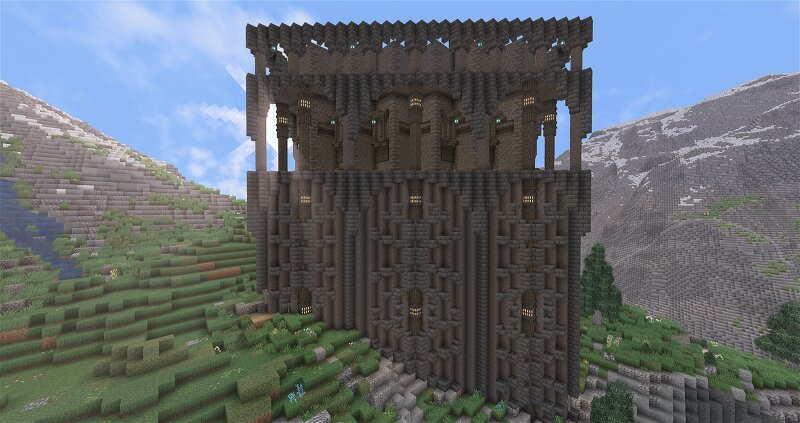
The monastery known as Xenothyme is under construction within the kingdom of Dysprositos! This fortress like monastery tower is being constructed high up in the Central Mountains on the continent of Vermance, available for curious travelers to explore and civilize on the Medieval Unlimited Server. Xenothyme is constructed of welded tuff from the deep volcanically active layers of magma intruded ancient black shale, as well as the black shale itself. Exotic walnut wood is imported from the far reaches of Vermance to give accents and construct functional aspects of the monastery such as interior stairs, railings, and window awnings. While the monastic abode is as of yet incomplete, there exists a farm and associated sod-roofed cabin on the adjacent slopes of the valley. The location itself was selected by the leader of Dysprositos to give truth to the underlying meaning of the kingdom, that being "hard to reach" in ancient tongues. This perch high up above the denser spruce forests and alluvial plains is a perfect location for gardening, bee keeping, traditional farming, quiet reflection, and the occasional repelling of bloodthirsty invaders who have heard tell of riches high up in t
Added value
What’s included on this page
Preview, categories, compatibility, and tools on this page — not a bare file mirror.
- Creator
- IcedEmpyre
- Source
- Minecraft downloads library on Eaglercraft Studio
- Type
- Minecraft map / world
- Price
- Free download on Eaglercraft Studio
- Curation
- Listed with credit to IcedEmpyre · studio preview & install guide
- Compatible with
- Minecraft Java (match version / loader in facts)
- Tags
- Castle, Custom, Customworld, Fort, Fortress, Hall
Install guide
How to install this free Minecraft map
Eaglercraft Studio map listing with preview, creator credit, and install steps for Java worlds.
- 1Download the world archive (.zip / .mcworld / schematic) when available.
- 2For Java: extract into your .minecraft/saves folder (or import via your launcher).
- 3Launch Minecraft, select the world, and play. Keep a backup before overwriting saves.
Check any version notes in the facts panel — maps often target a specific Minecraft release.
Related free maps
More curated maps from the same library section.

CraftyFoxe · 761 diamonds · 418 views

CraftyFoxe · 761 diamonds · 339 views

CraftyFoxe · 761 diamonds · 319 views

CraftyFoxe · 761 diamonds · 306 views