
Eastern European Residence Construction Site
Creator: Matteo_224 · 2026-09-05 · Maps · Free on Eaglercraft Studio
Download Eastern European Residence Construction Site — free Minecraft map. Created by Matteo_224. Tagged land structure. Get the world/schematic file when available and explore more free maps on Eaglercraft Studio.
Creator notes
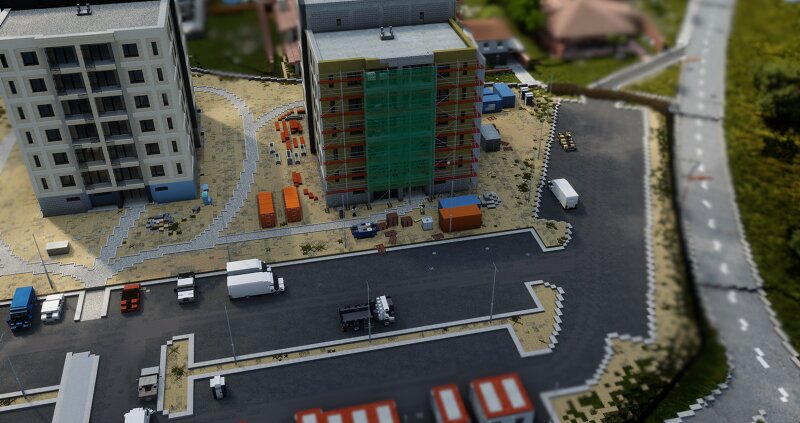
Welcome to my latest custom build project. This map features a highly detailed, modern residential construction complex . While the project is set within a European framework—specifically inspired by the atmosphere of urban areas in Slovakia and Eastern Europe —the architectural style of the buildings themselves draws heavy inspiration from modern Middle Eastern mid-rise residential developments , blending the two styles into a unique fusion. The build features three prominent residential blocks at various stages of completion, capturing the raw, industrious atmosphere of a live working zone. Quick 1-Minute Setup & Pure Vanilla Compatibility No Mods Required: This build does not use any mods at all . You do not need to install complex modpacks or configuration files to load this world. 1-Minute Access: Getting into the world takes less than a minute! You only need to drop the world folder into your saves, activate the included custom resource pack, and you are ready to explore. Every single block, custom model, texture, and screenshot you see was created entirely by hand , no AI tools were used in building this map, texturing the assets, or editing the photos.
Added value
What’s included on this page
Preview, categories, compatibility, and tools on this page — not a bare file mirror.
- Creator
- Matteo_224
- Source
- Minecraft downloads library on Eaglercraft Studio
- Type
- Minecraft map / world
- Price
- Free download on Eaglercraft Studio
- Curation
- Listed with credit to Matteo_224 · studio preview & install guide
- Compatible with
- Minecraft Java (match version / loader in facts)
- Tags
- Land Structure
Install guide
How to install this free Minecraft map
Eaglercraft Studio map listing with preview, creator credit, and install steps for Java worlds.
- 1Download the world archive (.zip / .mcworld / schematic) when available.
- 2For Java: extract into your .minecraft/saves folder (or import via your launcher).
- 3Launch Minecraft, select the world, and play. Keep a backup before overwriting saves.
Check any version notes in the facts panel — maps often target a specific Minecraft release.
Related free maps
More curated maps from the same library section.

CraftyFoxe · 761 diamonds · 418 views

CraftyFoxe · 761 diamonds · 339 views

CraftyFoxe · 761 diamonds · 319 views

CraftyFoxe · 761 diamonds · 306 views