
🏰 Embercrest Medieval House | Download!
Creator: MrLionUS · 2026-08-29 · Maps · Free on Eaglercraft Studio
Download 🏰 Embercrest Medieval House | Download! — free Minecraft map. Created by MrLionUS. Tagged base, build, building, builds. Get the world/schematic file when available and explore more free maps on Eaglercraft Studio.
Creator notes
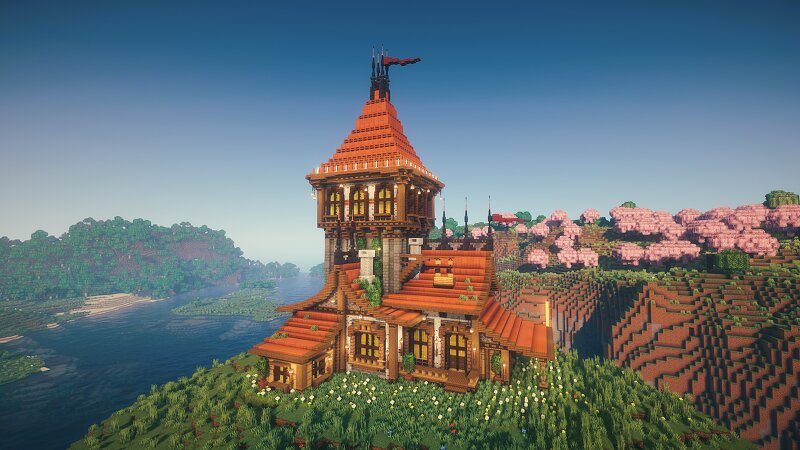
Welcome to Embercrest Medieval House — a beautifully detailed medieval fantasy home combining warm orange acacia rooftops, dark gothic accents, and classic timber craftsmanship. Featuring a striking multi-level tower, layered orange acacia roofs, elegant wooden balconies, stone supports, gothic spires, crimson banners, glowing lanterns, lush greenery, and a flower-filled garden, this build is designed to stand out in any medieval settlement. The centerpiece of the house is its impressive tall gothic tower , rising above the surrounding rooftops and giving the structure a distinctive medieval silhouette. The combination of orange acacia plank roofs , dark stone details, white plaster walls, detailed timber framing, and natural vegetation creates a warm yet prestigious atmosphere. With its large upper-floor windows, multiple roof sections, wooden balconies, hanging lanterns, decorative banners, and spacious exterior areas, Embercrest Medieval House works perfectly as a wealthy merchant's residence, noble home, guild house, craftsman's estate, or an important building within a medieval town.
Added value
What’s included on this page
Preview, categories, compatibility, and tools on this page — not a bare file mirror.
- Creator
- MrLionUS
- Source
- Minecraft downloads library on Eaglercraft Studio
- Type
- Minecraft map / world
- Price
- Free download on Eaglercraft Studio
- Curation
- Listed with credit to MrLionUS · studio preview & install guide
- Compatible with
- Minecraft Java (match version / loader in facts)
- Tags
- Base, Build, Building, Builds, Castle, City
Install guide
How to install this free Minecraft map
Eaglercraft Studio map listing with preview, creator credit, and install steps for Java worlds.
- 1Download the world archive (.zip / .mcworld / schematic) when available.
- 2For Java: extract into your .minecraft/saves folder (or import via your launcher).
- 3Launch Minecraft, select the world, and play. Keep a backup before overwriting saves.
Check any version notes in the facts panel — maps often target a specific Minecraft release.
Related free maps
More curated maps from the same library section.

CraftyFoxe · 761 diamonds · 418 views

CraftyFoxe · 761 diamonds · 339 views

CraftyFoxe · 761 diamonds · 319 views

CraftyFoxe · 761 diamonds · 306 views