
🏰 Emberstone Manor
Creator: NovaCraftG · 2026-09-29 · Maps · Free on Eaglercraft Studio
Download 🏰 Emberstone Manor — free Minecraft map. Created by NovaCraftG. Tagged other. Get the world/schematic file when available and explore more free maps on Eaglercraft Studio.
Creator notes
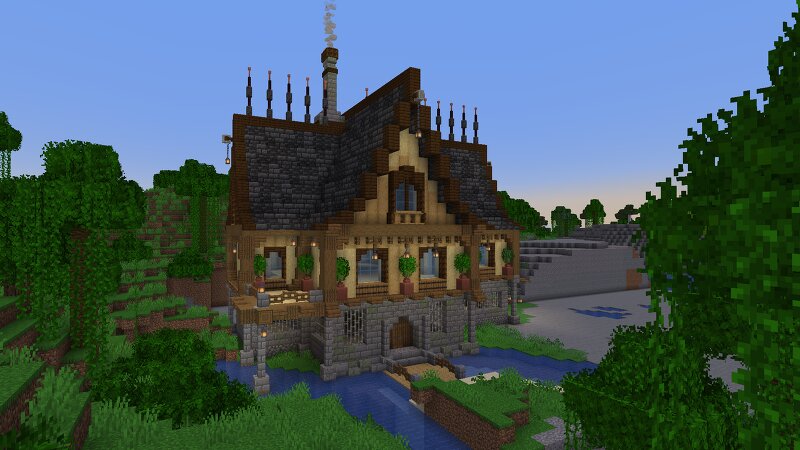
Welcome to Emberstone Manor , a masterfully crafted medieval architectural masterpiece designed to bring warmth, luxury, and ancient charm to your Minecraft world! Perched peacefully by a serene lakeside under a breathtaking golden sunset, this grand estate is the ultimate survival base or roleplay sanctuary. ✨ Key Features & Highlights: Stunning Medieval Architecture: Designed with rich stone brick foundations, natural wooden framing, and intricate detailing that captures the true essence of a classic fantasy manor. Warm & Cozy Atmosphere: Bathed in the golden glow of custom lanterns and warm interior lighting, creating an inviting and magical ambiance against the twilight sky. Scenic Waterfront Location: Elegantly built right on the edge of a tranquil lake, complete with a charming wooden bridge leading to your grand front entrance. Survival-Friendly Design: Features sturdy stone walls, a secure layout, and plenty of space inside for all your storage, crafting, and enchanting needs. Breathtaking Custom Lighting & Shaders Compatible: Looks absolutely phenomenal with modern shader packs, bringing out every single pixel of texture and warm ember tone. 📦 What’s Included: 🗺️ World dow
Added value
What’s included on this page
Preview, categories, compatibility, and tools on this page — not a bare file mirror.
- Creator
- NovaCraftG
- Source
- Minecraft downloads library on Eaglercraft Studio
- Type
- Minecraft map / world
- Price
- Free download on Eaglercraft Studio
- Curation
- Listed with credit to NovaCraftG · studio preview & install guide
- Compatible with
- Minecraft Java (match version / loader in facts)
- Tags
- Other
Install guide
How to install this free Minecraft map
Eaglercraft Studio map listing with preview, creator credit, and install steps for Java worlds.
- 1Download the world archive (.zip / .mcworld / schematic) when available.
- 2For Java: extract into your .minecraft/saves folder (or import via your launcher).
- 3Launch Minecraft, select the world, and play. Keep a backup before overwriting saves.
Check any version notes in the facts panel — maps often target a specific Minecraft release.
Related free maps
More curated maps from the same library section.

CraftyFoxe · 761 diamonds · 418 views

CraftyFoxe · 761 diamonds · 339 views

CraftyFoxe · 761 diamonds · 319 views

CraftyFoxe · 761 diamonds · 306 views