
"Ettinsmoor" Conquest Reforged
Creator: RedrangerBuilds · 2026-09-12 · Maps · Free on Eaglercraft Studio
Download "Ettinsmoor" Conquest Reforged — free Minecraft map. Created by RedrangerBuilds. Get the world/schematic file when available and explore more free maps on Eaglercraft Studio.
Creator notes
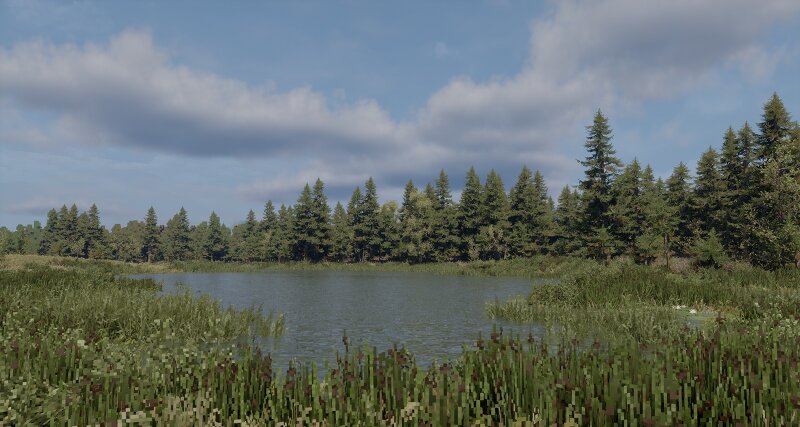
Ettinsmoor is a large-scale, highly realistic Minecraft landscape created in collaboration by Redranger and KongtheMonkey. The map spans 4,000 × 4,000 blocks, featuring a vast, boggy landscape inspired by the coniferous bogs of Europe. Around a third of the map is covered in dense larch and birch forests, while the remaining landscape consists of expansive wetlands, peatlands, shrubs, and scattered smaller trees. Throughout the terrain, numerous ponds, pools, and other pockets of water break up the wetlands, creating a varied and immersive landscape. Peat deposits, bogs, forests, and wet meadows give the terrain a distinct northern-European character, with a strong focus on natural variation and realism. Ettinsmoor is designed to feel like a vast, remote wilderness — an environment shaped by water, vegetation, and centuries of slow ecological change. Requirements Required: Conquest Reforged (Fabric) v1.6.2 Ardacraft Resource Pack Recommended Shaders Bliss Xonk's Bliss Performance Ettinsmoor is a large and highly detailed landscape, and as such, it can be quite resource-intensive to run. For the best experience, it is recommended to have: At least 8 GB of RAM available to Minecraft
Added value
What’s included on this page
Preview, categories, compatibility, and tools on this page — not a bare file mirror.
- Creator
- RedrangerBuilds
- Source
- Minecraft downloads library on Eaglercraft Studio
- Type
- Minecraft map / world
- Price
- Free download on Eaglercraft Studio
- Curation
- Listed with credit to RedrangerBuilds · studio preview & install guide
- Compatible with
- Minecraft Java (match version / loader in facts)
Install guide
How to install this free Minecraft map
Eaglercraft Studio map listing with preview, creator credit, and install steps for Java worlds.
- 1Download the world archive (.zip / .mcworld / schematic) when available.
- 2For Java: extract into your .minecraft/saves folder (or import via your launcher).
- 3Launch Minecraft, select the world, and play. Keep a backup before overwriting saves.
Check any version notes in the facts panel — maps often target a specific Minecraft release.
Related free maps
More curated maps from the same library section.

CraftyFoxe · 761 diamonds · 418 views

CraftyFoxe · 761 diamonds · 339 views

CraftyFoxe · 761 diamonds · 319 views

CraftyFoxe · 761 diamonds · 306 views