
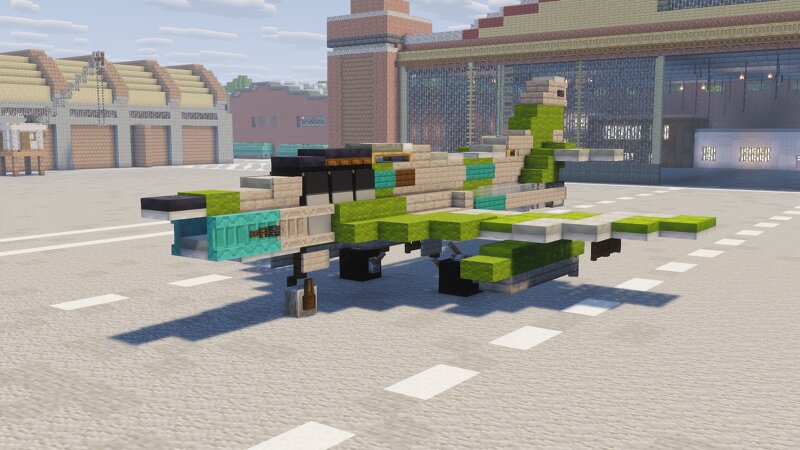
Fiat G.91Y ''Yankee''
Creator: Nuclear_SlimeBot · 2026-09-27 · Maps · Free on Eaglercraft Studio
Download Fiat G.91Y ''Yankee'' — free Minecraft map. Created by Nuclear_SlimeBot. Tagged italianjet, italy, jet, jetfighter. Get the world/schematic file when available and explore more free maps on Eaglercraft Studio.
Creator notes
HERE IT IS My favorite plane of ALL time, the Fiat G.91Y ''Yankee'', now with all the cushions and new features I was able to recreate the aircraft more accurately (all though it kind of looks like an RF-84F from certain angles haha). -Short History- After the success of the G.91 Gina strike fighters, Italy wanted to create a new variant of the iconic jet, but it was already the late 1960's, and Italy was already starting to fall behind, they needed to give the Gina more firepower. They started by completely re-designing the airframe, ensuring it could carry heavier payloads, but of course for that they'd need a powerful engine, so instead of the Orpheus MK.801 they gave the new G.91 two General Electric J-85-GE-13A's, the same engines found on aircraft like the F-5 Tiger. The first prototype flew in December 27th 1966 and it entered service in July 1968. It had a long service life of 26 years from 1968 to 1994, with 65 aircraft built plus two G.91YS Swiss prototypes (if I see ONE 67 joke in the comments the commenter shall perish) . The new G.91 was given the designation ''Y'', though it didn't mean anything more than a new evolution, the letter Y in the name gained the infamous n
Added value
What’s included on this page
Preview, categories, compatibility, and tools on this page — not a bare file mirror.
- Creator
- Nuclear_SlimeBot
- Source
- Minecraft downloads library on Eaglercraft Studio
- Type
- Minecraft map / world
- Price
- Free download on Eaglercraft Studio
- Curation
- Listed with credit to Nuclear_SlimeBot · studio preview & install guide
- Compatible with
- Minecraft Java (match version / loader in facts)
- Tags
- Italianjet, Italy, Jet, Jetfighter, Military, Militarybuild
Install guide
How to install this free Minecraft map
Eaglercraft Studio map listing with preview, creator credit, and install steps for Java worlds.
- 1Download the world archive (.zip / .mcworld / schematic) when available.
- 2For Java: extract into your .minecraft/saves folder (or import via your launcher).
- 3Launch Minecraft, select the world, and play. Keep a backup before overwriting saves.
Check any version notes in the facts panel — maps often target a specific Minecraft release.
Related free maps
More curated maps from the same library section.

CraftyFoxe · 761 diamonds · 418 views

CraftyFoxe · 761 diamonds · 339 views

CraftyFoxe · 761 diamonds · 319 views

CraftyFoxe · 761 diamonds · 306 views