
Fighting Arena
Creator: NoobGamerz125 · 2026-09-23 · Maps · Free on Eaglercraft Studio
Download Fighting Arena — free Minecraft map. Created by NoobGamerz125. Tagged arena, duel, duelarena, fighting. Get the world/schematic file when available and explore more free maps on Eaglercraft Studio.
Creator notes
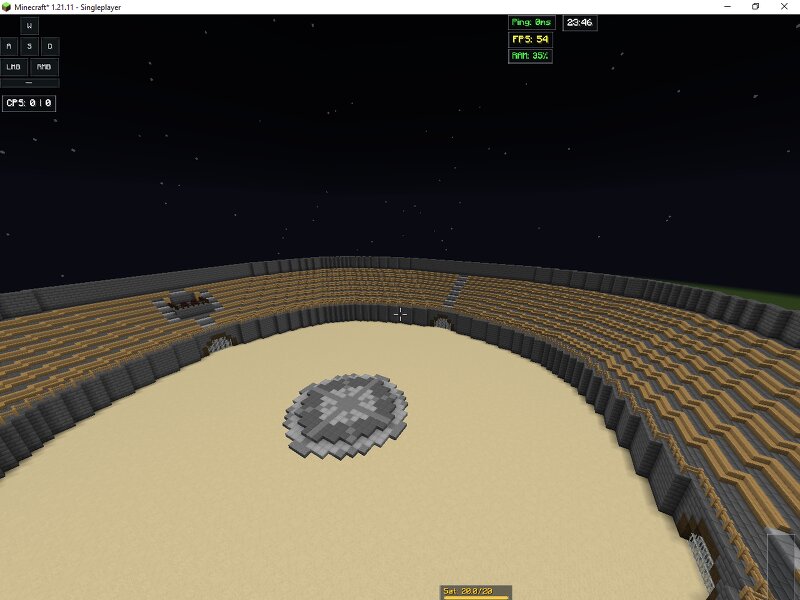
🏟️ The Grand Colosseum | Massive Ultimate Fighting ArenaWelcome to The Grand Colosseum , a monumental, stadium-scale arena built for epic Server Tournaments, Fighting Events, and High-Stakes Duels . Modeled after ancient Roman battlegrounds, this map features a massive circular sand pit completely surrounded by towering spectator stands to deliver an unmatched competitive atmosphere. With its incredible scale, this map is perfect for large-scale event networks that host massive player tournaments with live audiences watching safely from above. 🌟 Key Design Elements & Features Epic Circular Sand Arena: The battlefield floor is a massive, completely flat sand pit. This ensures 100% predictable player movement, fluid knockback mechanics, and high-contrast block placements for any PvP mode. Central Battle Emblem: Positioned perfectly at the center is a beautifully detailed circular stone platform. This acts as a majestic starting point or countdown hub for fighters before the match begins. Colossal Stadium Seating: Surrounding the entire pit are massive, tiered seating rows crafted from wood and stone. This allows dozens of server players to sit, watch, and cheer for live matches like
Added value
What’s included on this page
Preview, categories, compatibility, and tools on this page — not a bare file mirror.
- Creator
- NoobGamerz125
- Source
- Minecraft downloads library on Eaglercraft Studio
- Type
- Minecraft map / world
- Price
- Free download on Eaglercraft Studio
- Curation
- Listed with credit to NoobGamerz125 · studio preview & install guide
- Compatible with
- Minecraft Java (match version / loader in facts)
- Tags
- Arena, Duel, Duelarena, Fighting, Fightingarena, Hub
Install guide
How to install this free Minecraft map
Eaglercraft Studio map listing with preview, creator credit, and install steps for Java worlds.
- 1Download the world archive (.zip / .mcworld / schematic) when available.
- 2For Java: extract into your .minecraft/saves folder (or import via your launcher).
- 3Launch Minecraft, select the world, and play. Keep a backup before overwriting saves.
Check any version notes in the facts panel — maps often target a specific Minecraft release.
Related free maps
More curated maps from the same library section.

CraftyFoxe · 761 diamonds · 418 views

CraftyFoxe · 761 diamonds · 339 views

CraftyFoxe · 761 diamonds · 319 views

CraftyFoxe · 761 diamonds · 306 views