
Floating Chunks Large Survival Map
Creator: Gamon · 2026-09-01 · Maps · Free on Eaglercraft Studio
Download Floating Chunks Large Survival Map — free Minecraft map. Created by Gamon. Tagged challenge, chunk, chunks, chunksurvival. Get the world/schematic file when available and explore more free maps on Eaglercraft Studio.
Creator notes
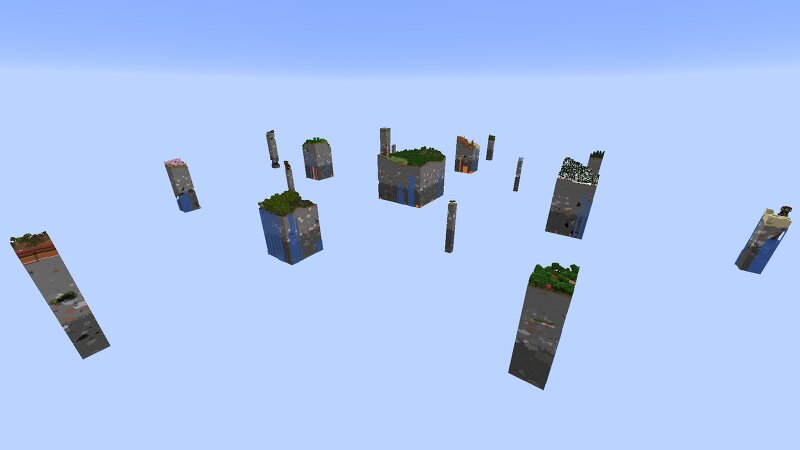
Floating chunks survival map is a map with chunks of the world floating above the void Version 26.1.1+ There are 17 unique chunk islands on this map in total each with a unique different biome and varying size and the largest one being the main central island where the player spawns and most of the chunk islands have a structure or more on them including underground structures like a full trial chamber in the main central island. Each chunk island is seperated by about 400 blocks of void between each island. This map is precisely made with each unique biome including cave biomes being there for real when you check your F3 menu you will see the unique biome of the chunk island you are standing on actualy there and cave biomes when you go underground so mobs native to that specific biome will naturaly spawn there and the void is just the void biome, i also didnt forget about the stronghold so you can find the stronghold on the main central island somewhere underground where the player spawns. You will need to use an LOD render distance mod like Voxy or Distant horizons if you want to see the entire map because you need 64+ chunks view distance to be able to see the entire map just
Added value
What’s included on this page
Preview, categories, compatibility, and tools on this page — not a bare file mirror.
- Creator
- Gamon
- Source
- Minecraft downloads library on Eaglercraft Studio
- Type
- Minecraft map / world
- Price
- Free download on Eaglercraft Studio
- Curation
- Listed with credit to Gamon · studio preview & install guide
- Compatible with
- Minecraft Java (match version / loader in facts)
- Tags
- Challenge, Chunk, Chunks, Chunksurvival, Floatingisland, Floatingislands
Install guide
How to install this free Minecraft map
Eaglercraft Studio map listing with preview, creator credit, and install steps for Java worlds.
- 1Download the world archive (.zip / .mcworld / schematic) when available.
- 2For Java: extract into your .minecraft/saves folder (or import via your launcher).
- 3Launch Minecraft, select the world, and play. Keep a backup before overwriting saves.
Check any version notes in the facts panel — maps often target a specific Minecraft release.
Related free maps
More curated maps from the same library section.

CraftyFoxe · 761 diamonds · 418 views

CraftyFoxe · 761 diamonds · 339 views

CraftyFoxe · 761 diamonds · 319 views

CraftyFoxe · 761 diamonds · 306 views