
Fort Wēstmearc - Kingdom of Stānseaxe - Survival Project | Medieval Unlimited Server
Creator: Neekoris · 2026-09-09 · Maps · Free on Eaglercraft Studio
Download Fort Wēstmearc - Kingdom of Stānseaxe - Survival Project | Medieval Un — free Minecraft map. Created by Neekoris. Tagged anglosaxon, barrow, burh, celtic. Get the world/schematic file when available and explore more free maps on Eaglercraft Studio.
Creator notes
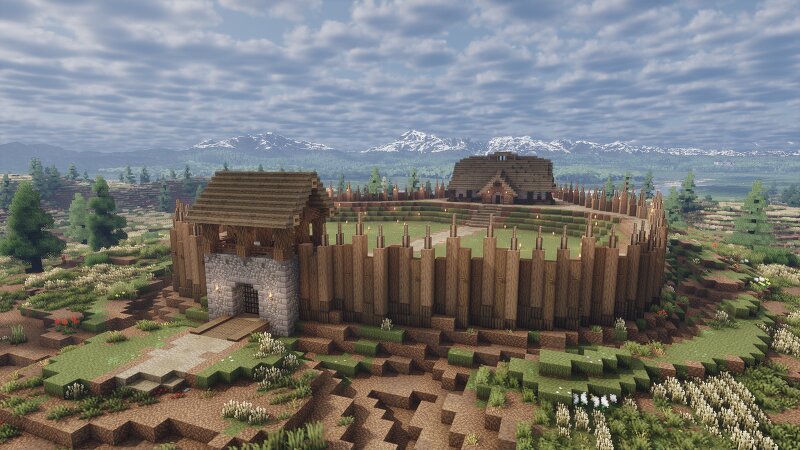
Fort Wēstmearc - Kingdom of Stānseaxe This is a brand new project I started for my Kingdom, Stānseaxe, on the Medieval Unlimited server. The Kingdoms is loosely based on an Anglo-Saxon/Celtic theme, has an addiction to making weird stone monoliths facing the rising sun (hence the name Stone Saxons), and we HATE BOARS and LOVE PIGS . Kingdom is dead now, so the project is basically over. This project is made entirely in survival and will serve as the home of my Kingdom for the foreseeable future. Feel free to come check it out on the server! Medieval Unlimited Server Information: Server IP: medievalunlimited.online Discord: https://discord.gg/vgnWPBAaah Planet Minecraft: https://www.planetminecraft.com/server/medieval-unlimited-1-19-3-factions-survival-semi-roleplay-realistic-gameplay-custom-biomes-and-more/ Thanks for viewing and I hope to see you on Medieval Unlimited soon!
Added value
What’s included on this page
Preview, categories, compatibility, and tools on this page — not a bare file mirror.
- Creator
- Neekoris
- Source
- Minecraft downloads library on Eaglercraft Studio
- Type
- Minecraft map / world
- Price
- Free download on Eaglercraft Studio
- Curation
- Listed with credit to Neekoris · studio preview & install guide
- Compatible with
- Minecraft Java (match version / loader in facts)
- Tags
- Anglosaxon, Barrow, Burh, Celtic, Fort, Hillfort
Install guide
How to install this free Minecraft map
Eaglercraft Studio map listing with preview, creator credit, and install steps for Java worlds.
- 1Download the world archive (.zip / .mcworld / schematic) when available.
- 2For Java: extract into your .minecraft/saves folder (or import via your launcher).
- 3Launch Minecraft, select the world, and play. Keep a backup before overwriting saves.
Check any version notes in the facts panel — maps often target a specific Minecraft release.
Related free maps
More curated maps from the same library section.

CraftyFoxe · 761 diamonds · 418 views

CraftyFoxe · 761 diamonds · 339 views

CraftyFoxe · 761 diamonds · 319 views

CraftyFoxe · 761 diamonds · 306 views