
FREE❗: 081-Heldia — 8000x8000
Creator: Heldia · 2026-08-29 · Maps · Free on Eaglercraft Studio
Download FREE❗: 081-Heldia — 8000x8000 — free Minecraft map. Created by Heldia. Tagged other. Get the world/schematic file when available and explore more free maps on Eaglercraft Studio.
Creator notes
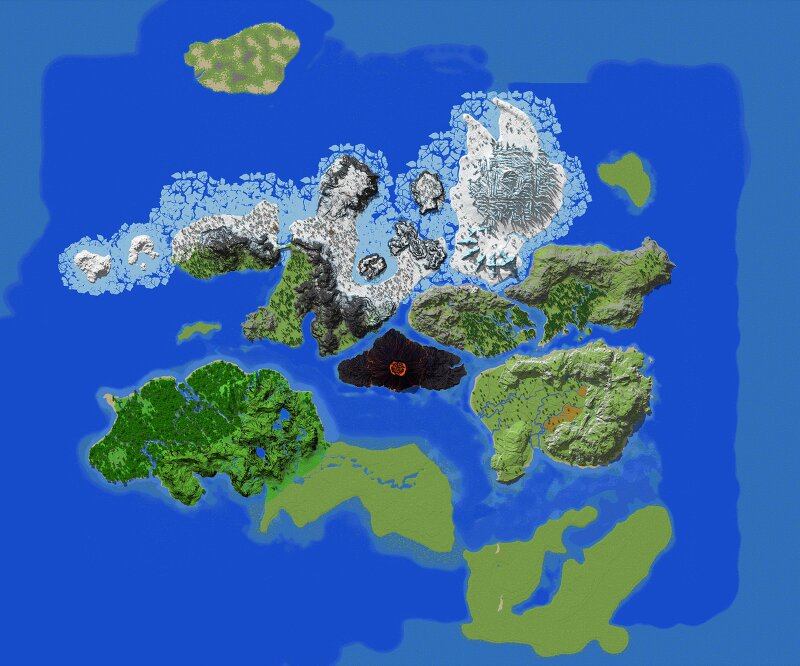
# 081-Heldia — 8000x8000 An older Roleplay world I created about a year ago, which was eventually put on hold and never got the chance to be properly used. ## 📏 Map Information Map Size: 8000 × 8000 blocks Compatible: Minecraft Java & Bedrock Editions ## 🌄 About This Map This is 081-Heldia, an old Roleplay world I created around a year ago. The map was originally designed for Roleplay, with various environments and areas prepared for players to explore and create their own stories. Unfortunately, the project was put on hold before it could really begin. Instead of letting the map sit forgotten, I've decided to release it for free and give someone else the chance to bring it to life. It's an older project, so it may not be as polished as my newer maps, but I hope it can still serve as a great foundation for something new. ## 🎮 Perfect For - Roleplay servers - MMO-style servers - Adventure and exploration maps - Fantasy projects - Large-scale world-building With an 8000 × 8000 block world, there's plenty of space to expand, modify, and create your own stories. ## 📥 Download & Usage This map is completely free to download. If you use it, please: 🌿 Credit Heldia as the original creator
Added value
What’s included on this page
Preview, categories, compatibility, and tools on this page — not a bare file mirror.
- Creator
- Heldia
- Source
- Minecraft downloads library on Eaglercraft Studio
- Type
- Minecraft map / world
- Price
- Free download on Eaglercraft Studio
- Curation
- Listed with credit to Heldia · studio preview & install guide
- Compatible with
- Minecraft Java (match version / loader in facts)
- Tags
- Other
Install guide
How to install this free Minecraft map
Eaglercraft Studio map listing with preview, creator credit, and install steps for Java worlds.
- 1Download the world archive (.zip / .mcworld / schematic) when available.
- 2For Java: extract into your .minecraft/saves folder (or import via your launcher).
- 3Launch Minecraft, select the world, and play. Keep a backup before overwriting saves.
Check any version notes in the facts panel — maps often target a specific Minecraft release.
Related free maps
More curated maps from the same library section.

CraftyFoxe · 761 diamonds · 418 views

CraftyFoxe · 761 diamonds · 339 views

CraftyFoxe · 761 diamonds · 319 views

CraftyFoxe · 761 diamonds · 306 views