
FREE❗: 111-Heldia-SkyMagic
Creator: Heldia · 2026-09-04 · Maps · Free on Eaglercraft Studio
Download FREE❗: 111-Heldia-SkyMagic — free Minecraft map. Created by Heldia. Get the world/schematic file when available and explore more free maps on Eaglercraft Studio.
Creator notes
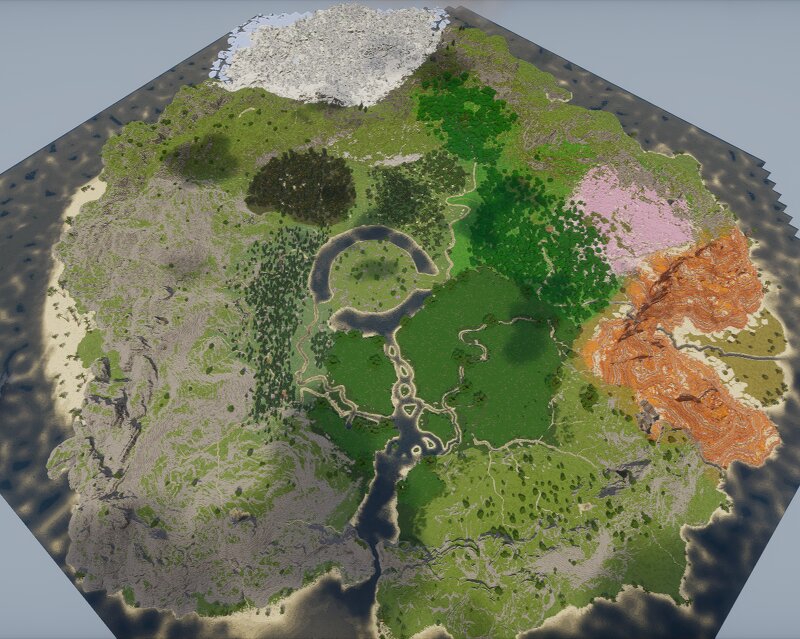
111-Heldia-SkyMagic The third Roleplay world I created a project that was successfully played and completed last year. 📏 Map Information Map Size: Large World Compatible: Minecraft Java & Bedrock Editions 🌄 About This Map This is 111-Heldia-SkyMagic, the third Roleplay world I created. Unlike some of my older Roleplay projects, this world actually got the chance to be played and completed successfully last year. The map was created specifically for a Roleplay project, with its world, environments, and locations designed around the stories and adventures of the players. It was a project that I was able to see through from beginning to end, making it a special part of my older Roleplay maps. After the Roleplay project was completed, the world was no longer being used. Rather than letting this map sit unused, I've decided to release it for free so that everyone can use it, explore it, and create their own stories. This is an older world from my Roleplay projects, so some parts may show the style and techniques I used at the time. However, I hope that the world can still be useful as a foundation for new adventures and projects. 🎮 Perfect For Roleplay servers MMO-style servers Fantasy
Added value
What’s included on this page
Preview, categories, compatibility, and tools on this page — not a bare file mirror.
- Creator
- Heldia
- Source
- Minecraft downloads library on Eaglercraft Studio
- Type
- Minecraft map / world
- Price
- Free download on Eaglercraft Studio
- Curation
- Listed with credit to Heldia · studio preview & install guide
- Compatible with
- Minecraft Java (match version / loader in facts)
Install guide
How to install this free Minecraft map
Eaglercraft Studio map listing with preview, creator credit, and install steps for Java worlds.
- 1Download the world archive (.zip / .mcworld / schematic) when available.
- 2For Java: extract into your .minecraft/saves folder (or import via your launcher).
- 3Launch Minecraft, select the world, and play. Keep a backup before overwriting saves.
Check any version notes in the facts panel — maps often target a specific Minecraft release.
Related free maps
More curated maps from the same library section.

CraftyFoxe · 761 diamonds · 418 views

CraftyFoxe · 761 diamonds · 339 views

CraftyFoxe · 761 diamonds · 319 views

CraftyFoxe · 761 diamonds · 306 views