
GIANT Skyblock!
Creator: Potato23979 · 2026-09-18 · Maps · Free on Eaglercraft Studio
Download GIANT Skyblock! — free Minecraft map. Created by Potato23979. Tagged challenge adventure, giant, skyblock, survival. Get the world/schematic file when available and explore more free maps on Eaglercraft Studio.
Creator notes
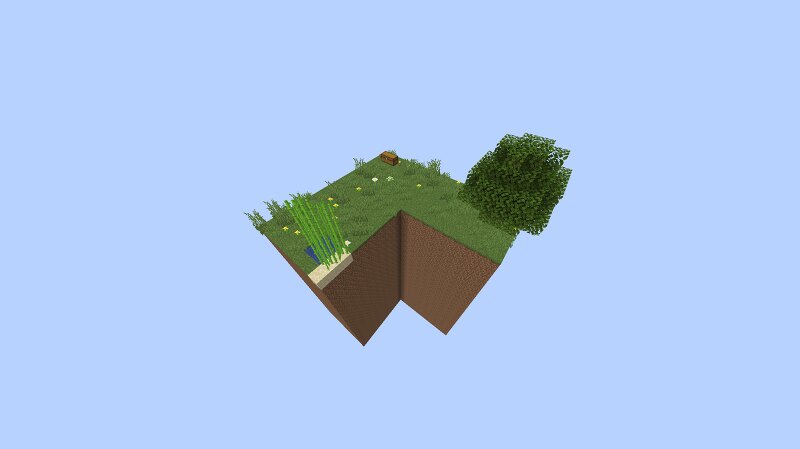
GIANT SKYBLOCK! Welcome to Giant skyblock which is just original Skyblock but gigantic and with more items to use! INFO All the rules are the same as original skyblock but read the list below if you don't know the original Skyblock rules. This map is for version 26.3 because the starter chest contains the new Poplar tree sapling from the new Dappled Forest biome. Don't place lots of spawners together or they might spawn thousands of mobs and lag your game!! Mob Griefing is turned off so you will not have to worry about creepers exploding! Grass and dirt both drop a grass block instead of dirt when mined with anything! Mob Spawners can be mined with anything and will drop but you will lose your original mob spawn egg! RULES Don't jump off the island purposefully to regen your health or hunger Don't use commands to do things that are not possible in normal skyblock like gaining extra items, changing gamemodes etc Don't mess up your cobblestone generator or you will have to restart the entire world! Have fun!!!
Added value
What’s included on this page
Preview, categories, compatibility, and tools on this page — not a bare file mirror.
- Creator
- Potato23979
- Source
- Minecraft downloads library on Eaglercraft Studio
- Type
- Minecraft map / world
- Price
- Free download on Eaglercraft Studio
- Curation
- Listed with credit to Potato23979 · studio preview & install guide
- Compatible with
- Minecraft Java (match version / loader in facts)
- Tags
- Challenge Adventure, Giant, Skyblock, Survival
Install guide
How to install this free Minecraft map
Eaglercraft Studio map listing with preview, creator credit, and install steps for Java worlds.
- 1Download the world archive (.zip / .mcworld / schematic) when available.
- 2For Java: extract into your .minecraft/saves folder (or import via your launcher).
- 3Launch Minecraft, select the world, and play. Keep a backup before overwriting saves.
Check any version notes in the facts panel — maps often target a specific Minecraft release.
Related free maps
More curated maps from the same library section.

CraftyFoxe · 761 diamonds · 418 views

CraftyFoxe · 761 diamonds · 339 views

CraftyFoxe · 761 diamonds · 319 views

CraftyFoxe · 761 diamonds · 306 views