
Glaemor 1.21.4+ | 8.000 x 8.000, Lonely Mountain/Realistic - RPG | Survival-Friendly | Java Edition | Custom Structures & Custom Caves
Creator: kintsukuroi · 2026-08-31 · Maps · Free on Eaglercraft Studio
Download Glaemor 1.21.4+ | 8.000 x 8.000, Lonely Mountain/Realistic - RPG | Sur — free Minecraft map. Created by kintsukuroi. Tagged 10k, adventure, best, biomes. Get the world/schematic file when available and explore more free maps on Eaglercraft Studio.
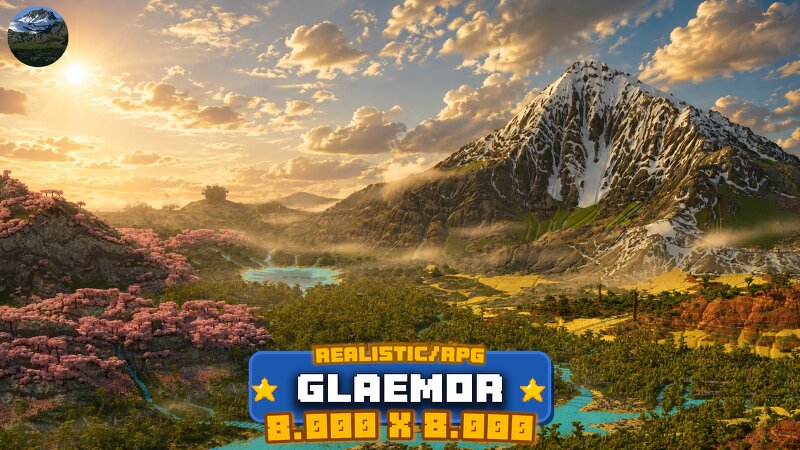
Creator notes
BIOMES LIST GENERAL INFORMATION STRUCTURES VERSION Snowy Taiga/Taiga ✔️ Survival-Friendly ✔️ Ocean Ruins/Shipwrecks ✔️ Works on Bedrock Edition ❌ Forest/Birch Forest ✔️ Vanilla Generation ✖️ Mineshafts and other Structures ✔️ Works on Java Edition 1.21.4+✅ Plains/Cherry Grove ✔️ Vanilla Generation on Bedrock Edition ✖️ Villages/Pillager Camps ✔️ BE AWARE The map will not work if you use a version below the ones mentioned. Pale Garden ✔️ Vanilla Generation on Java Edition ✔️ Stronghold/Ancient City ✔️ Height Limit Datapack: 1024 Massive Mountain Range ✔️ Map Overview ✔️ Dungeons ✔️ Dark Forest ✔️ Bedrock Installation Guide ✖️ Mansions ✔️ Acacia Forest ✔️ .RAR File ✔️ Custom Structures ✔️ Desert/Savannah ✔️ Constant updates/corrections based on client's feedback ✔️ Custom Caves ✔️ Ancient Forest ✔️ Extra file with just terrain ✔️
Added value
What’s included on this page
Preview, categories, compatibility, and tools on this page — not a bare file mirror.
- Creator
- kintsukuroi
- Source
- Minecraft downloads library on Eaglercraft Studio
- Type
- Minecraft map / world
- Price
- Free download on Eaglercraft Studio
- Curation
- Listed with credit to kintsukuroi · studio preview & install guide
- Compatible with
- Minecraft Java (match version / loader in facts)
- Tags
- 10k, Adventure, Best, Biomes, Challenge, Civilization
Install guide
How to install this free Minecraft map
Eaglercraft Studio map listing with preview, creator credit, and install steps for Java worlds.
- 1Download the world archive (.zip / .mcworld / schematic) when available.
- 2For Java: extract into your .minecraft/saves folder (or import via your launcher).
- 3Launch Minecraft, select the world, and play. Keep a backup before overwriting saves.
Check any version notes in the facts panel — maps often target a specific Minecraft release.
Related free maps
More curated maps from the same library section.

CraftyFoxe · 761 diamonds · 418 views

CraftyFoxe · 761 diamonds · 339 views

CraftyFoxe · 761 diamonds · 319 views

CraftyFoxe · 761 diamonds · 306 views