
GodzillaZachary's Clock Quest (Halloween Festival 2026)
Creator: GodzillaZachary · 2026-09-10 · Maps · Free on Eaglercraft Studio
Download GodzillaZachary's Clock Quest (Halloween Festival 2026) — free Minecraft map. Created by GodzillaZachary. Tagged america250, bigben, clock, disney. Get the world/schematic file when available and explore more free maps on Eaglercraft Studio.
Creator notes
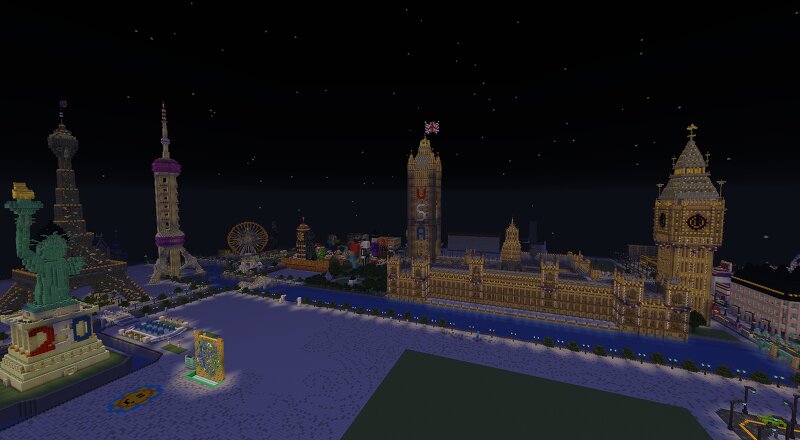
Halloween 2026 has arrived in my map! The Hallows Eve Festival lasts this year from September 10th to October 31st. When the festival ends, a new festival will happen in the map alongside a bunch of changes that are to come. For now, feel free to check out my map that's still under construction but has some great decorations put up for the spooky season. Please do not take down the decorations or do any certain modifications with them. You can turn the daylight cycle/advance time on when you go in, or you can keep it nighttime. If night's not your thing, turn it on if you want to see how the map looks during the day. There is also red, white, and blue up as I am celebrating America250 in the map to honor the United States! Have a spooktacular time exploring! And do not cross the obsidian walls as that's the map's border and I am still expanding. There is more to come this spooky season, and have a good rest of your day! Feel free to give the map a like and a diamond if you enjoy it!
Added value
What’s included on this page
Preview, categories, compatibility, and tools on this page — not a bare file mirror.
- Creator
- GodzillaZachary
- Source
- Minecraft downloads library on Eaglercraft Studio
- Type
- Minecraft map / world
- Price
- Free download on Eaglercraft Studio
- Curation
- Listed with credit to GodzillaZachary · studio preview & install guide
- Compatible with
- Minecraft Java (match version / loader in facts)
- Tags
- America250, Bigben, Clock, Disney, Godzillazachary, Halloween2026
Install guide
How to install this free Minecraft map
Eaglercraft Studio map listing with preview, creator credit, and install steps for Java worlds.
- 1Download the world archive (.zip / .mcworld / schematic) when available.
- 2For Java: extract into your .minecraft/saves folder (or import via your launcher).
- 3Launch Minecraft, select the world, and play. Keep a backup before overwriting saves.
Check any version notes in the facts panel — maps often target a specific Minecraft release.
Related free maps
More curated maps from the same library section.

CraftyFoxe · 761 diamonds · 418 views

CraftyFoxe · 761 diamonds · 339 views

CraftyFoxe · 761 diamonds · 319 views

CraftyFoxe · 761 diamonds · 306 views