
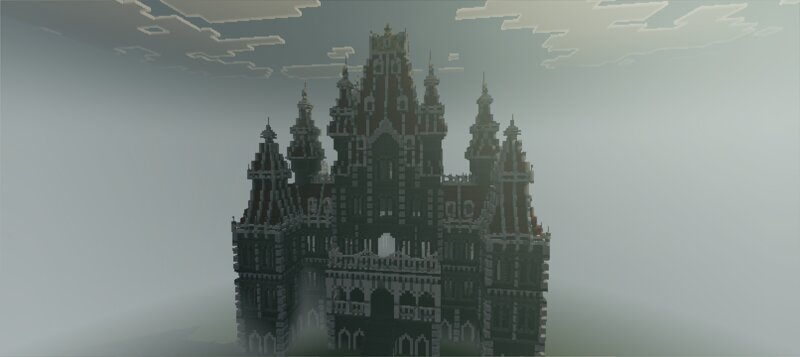
Grand manor noble Castle
Creator: Lxutix · 2026-09-30 · Maps · Free on Eaglercraft Studio
Download Grand manor noble Castle — free Minecraft map. Created by Lxutix. Get the world/schematic file when available and explore more free maps on Eaglercraft Studio.
Creator notes
The Sovereign Grand Manor CastleWelcome to The Sovereign Grand Manor Castle, a highly detailed, gothic-inspired fantasy fortress meticulously recreated in Minecraft Bedrock. Based on exquisite medieval miniature models, this project focuses on intricate architecture, soaring spires, and majestic structural harmony.To give you the best experience, this project includes two world files:Flat World (Creative/Showcase): Ideal for exploring the architecture, taking screenshots, or copying the build into your own worlds.Survival World: The manor is implanted into an epic, world-famous circular valley seed surrounded by jagged snowy peaks and a cozy village nearby.🔍 PROJECT STATUS & FUTURE UPDATESExterior: 100% Full & Completed! Meticulously detailed from every angle.Interior: Currently empty. A massive interior design update is already in development!Survival Map: Currently features the manor in its clean, raw state. A future custom terraforming update will surround the castle with a massive, organic custom-shaped lake/moat, medieval bridges, and connected pathways to the village.Download now and start your ultimate survival kingdom! Stay tuned for upcoming updates!⚙️ TECHNICAL DETAILSGam
Added value
What’s included on this page
Preview, categories, compatibility, and tools on this page — not a bare file mirror.
- Creator
- Lxutix
- Source
- Minecraft downloads library on Eaglercraft Studio
- Type
- Minecraft map / world
- Price
- Free download on Eaglercraft Studio
- Curation
- Listed with credit to Lxutix · studio preview & install guide
- Compatible with
- Minecraft Java (match version / loader in facts)
Install guide
How to install this free Minecraft map
Eaglercraft Studio map listing with preview, creator credit, and install steps for Java worlds.
- 1Download the world archive (.zip / .mcworld / schematic) when available.
- 2For Java: extract into your .minecraft/saves folder (or import via your launcher).
- 3Launch Minecraft, select the world, and play. Keep a backup before overwriting saves.
Check any version notes in the facts panel — maps often target a specific Minecraft release.
Related free maps
More curated maps from the same library section.

CraftyFoxe · 761 diamonds · 418 views

CraftyFoxe · 761 diamonds · 339 views

CraftyFoxe · 761 diamonds · 319 views

CraftyFoxe · 761 diamonds · 306 views