
Gravity falls
Creator: MrevilZombie · 2026-09-13 · Maps · Free on Eaglercraft Studio
Download Gravity falls — free Minecraft map. Created by MrevilZombie. Tagged minecart. Get the world/schematic file when available and explore more free maps on Eaglercraft Studio.
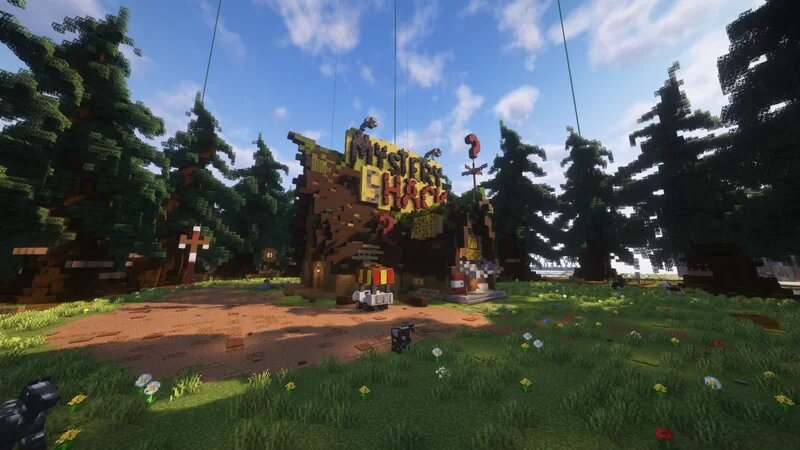
Creator notes
After spending countless hours with my friends building this massive, block-by-block recreation of Gravity Falls on our Java server, I finally had the chance to port it over to Bedrock! We wanted to make sure every single detail was perfect—from the Mystery Shack to the deep secrets hidden in the woods. It's still a work in progress and not fully finished yet. We don't have the full town done, and some of the buildings don't have inside stuff set up just yet. We are pretty busy with school right now, but when we have a chance and get some free time, we will definitely update it more. It took a ton of work to get the conversion looking right, but the town is finally playable on Bedrock. Welcome to Gravity Falls!" -Note: This won’t be a perfect 1:1 recreation of Gravity Falls, since recreating every detail is really difficult. I’ll still do my best to make it as close to the original as possible while continuing to add more buildings, interiors, and details over time. Thanks for supporting the project! ❤️
Added value
What’s included on this page
Preview, categories, compatibility, and tools on this page — not a bare file mirror.
- Creator
- MrevilZombie
- Source
- Minecraft downloads library on Eaglercraft Studio
- Type
- Minecraft map / world
- Price
- Free download on Eaglercraft Studio
- Curation
- Listed with credit to MrevilZombie · studio preview & install guide
- Compatible with
- Minecraft Java (match version / loader in facts)
- Tags
- Minecart
Install guide
How to install this free Minecraft map
Eaglercraft Studio map listing with preview, creator credit, and install steps for Java worlds.
- 1Download the world archive (.zip / .mcworld / schematic) when available.
- 2For Java: extract into your .minecraft/saves folder (or import via your launcher).
- 3Launch Minecraft, select the world, and play. Keep a backup before overwriting saves.
Check any version notes in the facts panel — maps often target a specific Minecraft release.
Related free maps
More curated maps from the same library section.

CraftyFoxe · 761 diamonds · 418 views

CraftyFoxe · 761 diamonds · 339 views

CraftyFoxe · 761 diamonds · 319 views

CraftyFoxe · 761 diamonds · 306 views