
Greenland - Disko Island (4k by 4k)
Creator: Rics888 · 2026-09-18 · Maps · Free on Eaglercraft Studio
Download Greenland - Disko Island (4k by 4k) — free Minecraft map. Created by Rics888. Tagged beach, big, disk, disko. Get the world/schematic file when available and explore more free maps on Eaglercraft Studio.
Creator notes
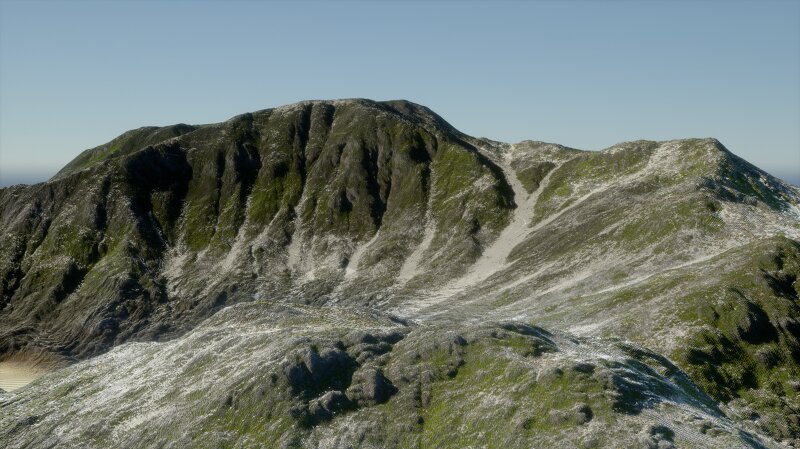
This is a 4096 times 4096 blocks big map. It is also more than 1500 blocks tall . It was based and inspired by the Disko Island in Greenland . It has a very interesting and unusual nature with its Ice-plates, Snowy soft slopes and pretty simple fauna layers. This map contains: Huge sloped mountainsides Wide beaches with rock formations Realistic snow scattering Ice-plates (more than 5 layers with different textures/colours) Green plant covering most of the surface Many smaller rivers curving around the rocks Rugged rocks realistically crumpled I have a discord server: The invitation link is on my profile I recommend using distant horizons, or just playing with a high render distance. I highly recommend using NatureX or Bushy leaves resource packs: https://modrinth.com/resourcepack/nature-x https://modrinth.com/resourcepack/better-leaves I always use: Bliss main, photon, IterationT shaders.
Added value
What’s included on this page
Preview, categories, compatibility, and tools on this page — not a bare file mirror.
- Creator
- Rics888
- Source
- Minecraft downloads library on Eaglercraft Studio
- Type
- Minecraft map / world
- Price
- Free download on Eaglercraft Studio
- Curation
- Listed with credit to Rics888 · studio preview & install guide
- Compatible with
- Minecraft Java (match version / loader in facts)
- Tags
- Beach, Big, Disk, Disko, Gigantic, Green
Install guide
How to install this free Minecraft map
Eaglercraft Studio map listing with preview, creator credit, and install steps for Java worlds.
- 1Download the world archive (.zip / .mcworld / schematic) when available.
- 2For Java: extract into your .minecraft/saves folder (or import via your launcher).
- 3Launch Minecraft, select the world, and play. Keep a backup before overwriting saves.
Check any version notes in the facts panel — maps often target a specific Minecraft release.
Related free maps
More curated maps from the same library section.

CraftyFoxe · 761 diamonds · 418 views

CraftyFoxe · 761 diamonds · 339 views

CraftyFoxe · 761 diamonds · 319 views

CraftyFoxe · 761 diamonds · 306 views