
Happy Plants Duo Survival Base (Java Download + 2D Guides for Bedrock)
Creator: Benjimin_MC · 2026-09-05 · Maps · Free on Eaglercraft Studio
Download Happy Plants Duo Survival Base (Java Download + 2D Guides for Bedrock) — free Minecraft map. Created by Benjimin_MC. Tagged base, cute, duo, fantasy. Get the world/schematic file when available and explore more free maps on Eaglercraft Studio.
Creator notes
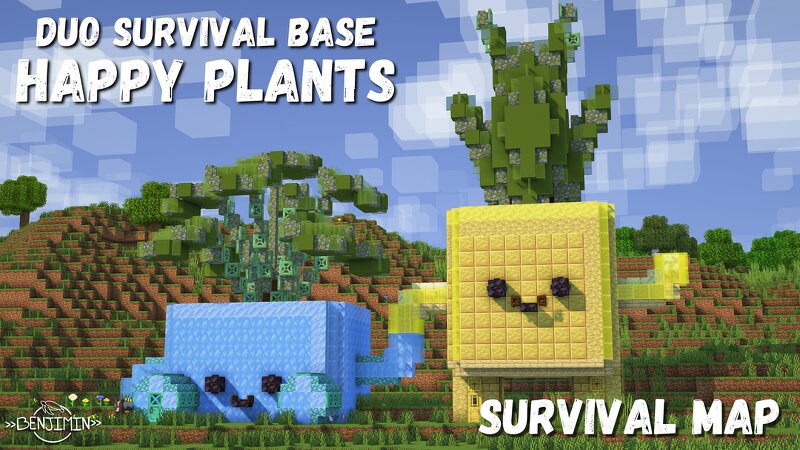
Minecraft Survival Happy Plants Duo Base is a cozy survival base for 2 players inspired by the Blue and Yellow Happy Plants LEGO Set! The Build has two unique houses with their own interior, complemention each others colours. Though the main version of this build has both happy plant post holding hands, you can also download the two builds individually. This post includes 3 survival maps and schematic sets, one for the two pots holding hands, one for the blue happy plant, and one for the yellow happy plant! Each and every one of them is ready for your new adventure! Made in Minecraft 26.1.2 Do you not use mods or are you a Bedrock users? You can use the provided files to create 2D and 3D build guides using this website , so you can recreate this build even without any mods! I hope you enjoy <3
Added value
What’s included on this page
Preview, categories, compatibility, and tools on this page — not a bare file mirror.
- Creator
- Benjimin_MC
- Source
- Minecraft downloads library on Eaglercraft Studio
- Type
- Minecraft map / world
- Price
- Free download on Eaglercraft Studio
- Curation
- Listed with credit to Benjimin_MC · studio preview & install guide
- Compatible with
- Minecraft Java (match version / loader in facts)
- Tags
- Base, Cute, Duo, Fantasy, Land Structure, Lego
Install guide
How to install this free Minecraft map
Eaglercraft Studio map listing with preview, creator credit, and install steps for Java worlds.
- 1Download the world archive (.zip / .mcworld / schematic) when available.
- 2For Java: extract into your .minecraft/saves folder (or import via your launcher).
- 3Launch Minecraft, select the world, and play. Keep a backup before overwriting saves.
Check any version notes in the facts panel — maps often target a specific Minecraft release.
Related free maps
More curated maps from the same library section.

CraftyFoxe · 761 diamonds · 418 views

CraftyFoxe · 761 diamonds · 339 views

CraftyFoxe · 761 diamonds · 319 views

CraftyFoxe · 761 diamonds · 306 views