
Havana Quarter | DOWNLOAD
Creator: MineDesigns · 2026-09-08 · Maps · Free on Eaglercraft Studio
Download Havana Quarter | DOWNLOAD — free Minecraft map. Created by MineDesigns. Tagged awesome, build, building, city. Get the world/schematic file when available and explore more free maps on Eaglercraft Studio.
Creator notes
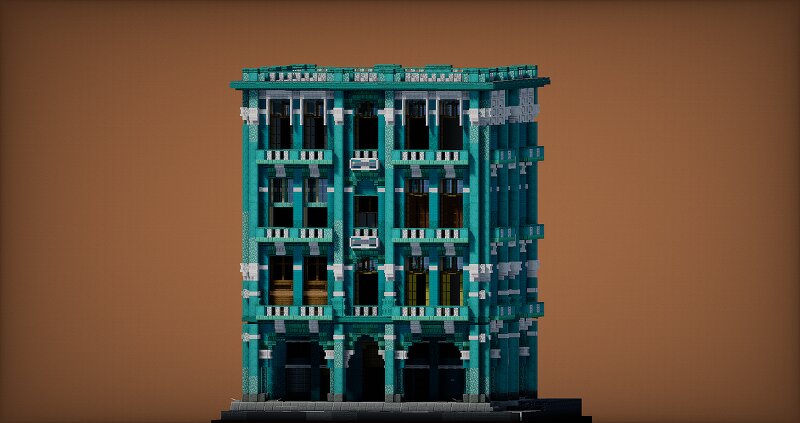
Havana Quarter This time I decided to step away from the usual European architecture and build something with a completely different atmosphere — a building inspired by Havana . I wanted to capture that distinctive Caribbean feeling: bright turquoise colors, tall windows, balconies, decorative facades and a slightly weathered look that makes the building feel like it has been standing here for decades. The combination of turquoise blocks with light stone details ended up giving the facade exactly the kind of tropical character I was looking for. I also paid a lot of attention to the smaller architectural elements — the railings, window frames, columns and decorations around the facade. Even though the building is relatively compact, there are quite a few details packed into it. Some more Information: After subscribe, you can download all my maps ! Commercial use is prohibited without the permission of the copyright holder MineDesigns Join my discord Subscribe on YouTube Build your dreams with MineDesigns! Check out my other builds:
Added value
What’s included on this page
Preview, categories, compatibility, and tools on this page — not a bare file mirror.
- Creator
- MineDesigns
- Source
- Minecraft downloads library on Eaglercraft Studio
- Type
- Minecraft map / world
- Price
- Free download on Eaglercraft Studio
- Curation
- Listed with credit to MineDesigns · studio preview & install guide
- Compatible with
- Minecraft Java (match version / loader in facts)
- Tags
- Awesome, Build, Building, City, Cool, Custom
Install guide
How to install this free Minecraft map
Eaglercraft Studio map listing with preview, creator credit, and install steps for Java worlds.
- 1Download the world archive (.zip / .mcworld / schematic) when available.
- 2For Java: extract into your .minecraft/saves folder (or import via your launcher).
- 3Launch Minecraft, select the world, and play. Keep a backup before overwriting saves.
Check any version notes in the facts panel — maps often target a specific Minecraft release.
Related free maps
More curated maps from the same library section.

CraftyFoxe · 761 diamonds · 418 views

CraftyFoxe · 761 diamonds · 339 views

CraftyFoxe · 761 diamonds · 319 views

CraftyFoxe · 761 diamonds · 306 views