
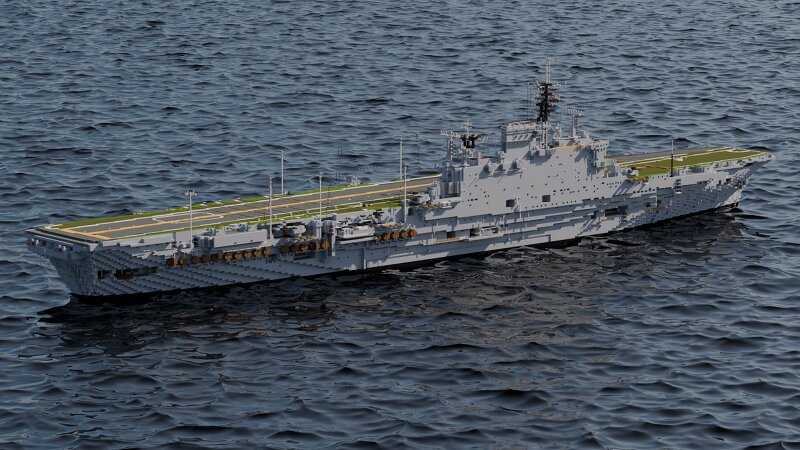
HMS Eagle R05 (1955, 1964) | 1:1 Scale
Creator: Haya__ · 2026-09-01 · Maps · Free on Eaglercraft Studio
Download HMS Eagle R05 (1955, 1964) | 1:1 Scale — free Minecraft map. Created by Haya__. Tagged aircraftcarrier, boat, coldwar, eagle. Get the world/schematic file when available and explore more free maps on Eaglercraft Studio.
Creator notes
Special thanks to Empress_Victoria for the renders and other vessels featured in this submission. HMS Eagle was an Audacious-class aircraft carrier of the Royal Navy, in service 1951–1972. Until the arrival of the Queen Elizabeth-class aircraft carriers in the 21st century, she and her sister Ark Royal were the two largest Royal Navy aircraft carriers ever built. She was laid down World War II on 24 October 1942 at Harland and Wolff shipyard in Belfast as one of four ships of the Audacious class. Two were cancelled at the end of hostilities, and the remaining two were suspended. Originally called Audacious, she was renamed Eagle (the fifteenth Royal Navy ship to receive this name), taking the name of the cancelled third ship of the class on 21 January 1946. She was finally launched by Princess Elizabeth on 19 March 1946.[5][6] Although Eagle was completed in October 1951 without an angled flight deck, one was added three years later. In 1952 she took part in the first large NATO naval exercise, Exercise Mainbrace. I finally have a full class of ships submitted to PMC, the world rejoices! I thought it best to complete her alongside Ark, as not only do I prefer her refit visually -
Added value
What’s included on this page
Preview, categories, compatibility, and tools on this page — not a bare file mirror.
- Creator
- Haya__
- Source
- Minecraft downloads library on Eaglercraft Studio
- Type
- Minecraft map / world
- Price
- Free download on Eaglercraft Studio
- Curation
- Listed with credit to Haya__ · studio preview & install guide
- Compatible with
- Minecraft Java (match version / loader in facts)
- Tags
- Aircraftcarrier, Boat, Coldwar, Eagle, Large, Ocean
Install guide
How to install this free Minecraft map
Eaglercraft Studio map listing with preview, creator credit, and install steps for Java worlds.
- 1Download the world archive (.zip / .mcworld / schematic) when available.
- 2For Java: extract into your .minecraft/saves folder (or import via your launcher).
- 3Launch Minecraft, select the world, and play. Keep a backup before overwriting saves.
Check any version notes in the facts panel — maps often target a specific Minecraft release.
Related free maps
More curated maps from the same library section.

CraftyFoxe · 761 diamonds · 418 views

CraftyFoxe · 761 diamonds · 339 views

CraftyFoxe · 761 diamonds · 319 views

CraftyFoxe · 761 diamonds · 306 views