
How to Make Realistic Water in Minecraft Using Stained Glass | Tutorial
Creator: JustPinkCake · 2026-09-18 · Maps · Free on Eaglercraft Studio
Download How to Make Realistic Water in Minecraft Using Stained Glass | Tutoria — free Minecraft map. Created by JustPinkCake. Tagged beach, building, coast, idea. Get the world/schematic file when available and explore more free maps on Eaglercraft Studio.
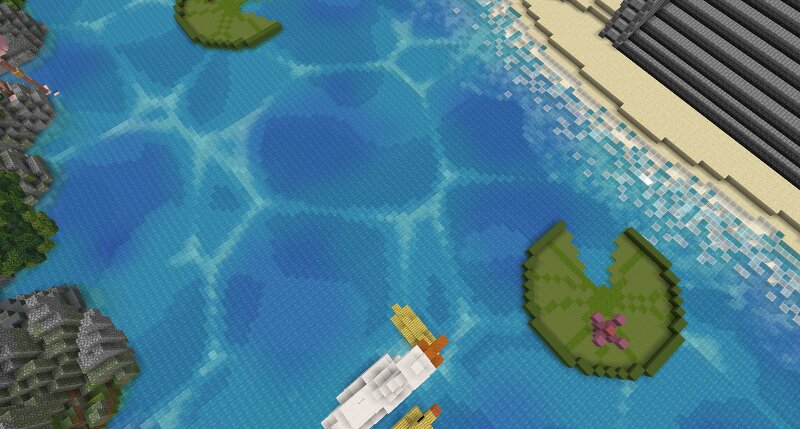
Creator notes
This is a simple building technique I use to give water more realistic details without looking weird or make it not usable. We can place different layers of stained glass underneath the water to create lighter and darker areas similar to how the light makes the water looks in real life, The only Tool that you may need is WorldEdit or AXIOM. 1. First Layer (Make sure that your build is 6-8 blocks deep) Place a pure water first 2. Blue Stained Glass Place a layer of blue stained glass 1 block up of the water base layer 3. Add Light Blue Stained Glass Leave 1 block of difference between the blue glass layer and make a pure 4. Third Stained Glass Layer Were gonna make another Blue Stained Glass layer taking 1 block up of the Light Blue glass layer that we already made. 5. Noise Painter (AXIOM) 1 Were gonna paint the Blue Stained glass layer using the Noise Painter to make darker spots areas with Blue Wool and Blue Concrete with the Simplex Brush (similar to the image) 6. Water texture Now were gonna make the patterns, we will use the Worley Brush and were gonna modify the Block count rate lowering it with every block were gonna use. In this case were gonna start with the Light Blue Sta
Added value
What’s included on this page
Preview, categories, compatibility, and tools on this page — not a bare file mirror.
- Creator
- JustPinkCake
- Source
- Minecraft downloads library on Eaglercraft Studio
- Type
- Minecraft map / world
- Price
- Free download on Eaglercraft Studio
- Curation
- Listed with credit to JustPinkCake · studio preview & install guide
- Compatible with
- Minecraft Java (match version / loader in facts)
- Tags
- Beach, Building, Coast, Idea, Isle, Jungle
Install guide
How to install this free Minecraft map
Eaglercraft Studio map listing with preview, creator credit, and install steps for Java worlds.
- 1Download the world archive (.zip / .mcworld / schematic) when available.
- 2For Java: extract into your .minecraft/saves folder (or import via your launcher).
- 3Launch Minecraft, select the world, and play. Keep a backup before overwriting saves.
Check any version notes in the facts panel — maps often target a specific Minecraft release.
Related free maps
More curated maps from the same library section.

CraftyFoxe · 761 diamonds · 418 views

CraftyFoxe · 761 diamonds · 339 views

CraftyFoxe · 761 diamonds · 319 views

CraftyFoxe · 761 diamonds · 306 views