
I Finally Updated My 13 Year Old Minecraft Team Strategy Game: Team Attack
Creator: warfcat+ · 2026-09-17 · Maps · Free on Eaglercraft Studio
Download I Finally Updated My 13 Year Old Minecraft Team Strategy Game: Team At — free Minecraft map. Created by warfcat+. Tagged advanced, challenge adventure, classic, custom. Get the world/schematic file when available and explore more free maps on Eaglercraft Studio.
Creator notes
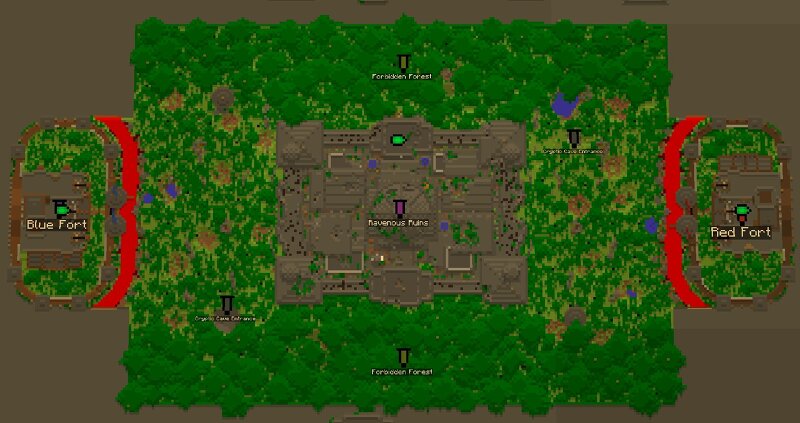
Team Attack started in 2013 , and it was never really supposed to become anything this big. The whole idea started when I was in high school. A group of us would get on Minecraft during class, load into a flatland world, spend the first half of the period building forts, then spend the second half trying to kill each other. After doing that enough times, I started thinking there had to be a better way. Why not just build the forts ahead of time and make an actual game out of it? At its core, Team Attack is a team-based PvP STRATEGY game. Two teams fight across one battlefield, each defending their own castle while trying to breach the enemy castle and reach its control room. The main objective is simple: get inside the enemy control room and press the button. Actually getting there is the hard part. Players are in Adventure Mode, so you cannot just break your way through the castle. First, your team has to breach the front wall by shooting a button that releases water over the lava moat. Once the lava is covered, your team can cross and enter the enemy base. The castle is where the enemy team respawns, so once you get inside, you're fighting in the most dangerous part of their side
Added value
What’s included on this page
Preview, categories, compatibility, and tools on this page — not a bare file mirror.
- Creator
- warfcat+
- Source
- Minecraft downloads library on Eaglercraft Studio
- Type
- Minecraft map / world
- Price
- Free download on Eaglercraft Studio
- Curation
- Listed with credit to warfcat+ · studio preview & install guide
- Compatible with
- Minecraft Java (match version / loader in facts)
- Tags
- Advanced, Challenge Adventure, Classic, Custom, Exciting, Friendly
Install guide
How to install this free Minecraft map
Eaglercraft Studio map listing with preview, creator credit, and install steps for Java worlds.
- 1Download the world archive (.zip / .mcworld / schematic) when available.
- 2For Java: extract into your .minecraft/saves folder (or import via your launcher).
- 3Launch Minecraft, select the world, and play. Keep a backup before overwriting saves.
Check any version notes in the facts panel — maps often target a specific Minecraft release.
Related free maps
More curated maps from the same library section.

CraftyFoxe · 761 diamonds · 418 views

CraftyFoxe · 761 diamonds · 339 views

CraftyFoxe · 761 diamonds · 319 views

CraftyFoxe · 761 diamonds · 306 views