
Insterburg. Haus in der Jordanstraße
Creator: AzazelKa · 2026-09-23 · Maps · Free on Eaglercraft Studio
Download Insterburg. Haus in der Jordanstraße — free Minecraft map. Created by AzazelKa. Tagged other. Get the world/schematic file when available and explore more free maps on Eaglercraft Studio.
Creator notes
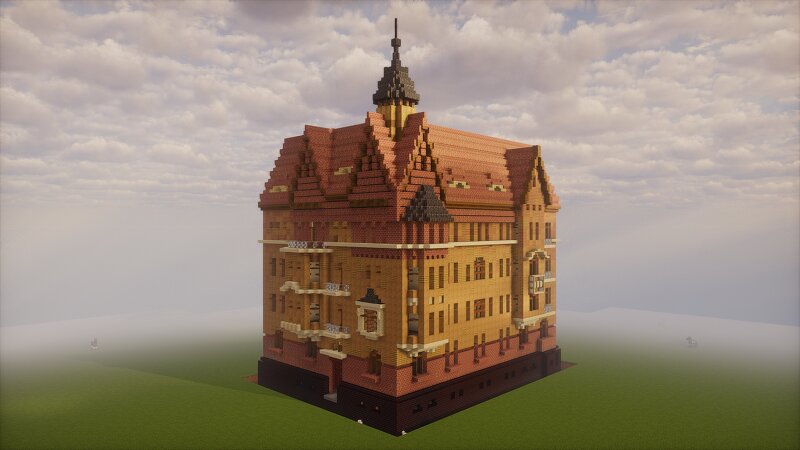
The house at the intersection of Komsomolskaya and Telman streets was built in the Jugendstil style in 1905. The four-story building with a gable roof and four gables is part of the residential complex 'Port-Arthur'. The facade is decorated with bay windows and balconies. The first and fourth floors are faced with brick, while the rest is covered with plaster. The building was recognized as a revealed cultural heritage site. In June 2022, an expert review approved the inclusion of the house in the register of monuments of regional significance. Дом на пересечении улиц Комсомольской и Тельмана построили в югенд-стиле в 1905 году. Четырёхэтажное здание с двускатной крышей и четырьмя щипцами входит в состав жилого комплекса «Порт-Артур». Фасад украшают эркеры с балконами. Первый и четвёртый этажи облицованы кирпичом, остальная часть покрыта штукатуркой. Здание признавали выявленным объектом культурного наследия. В июне 2022 года экспертиза одобрила включение дома в реестр памятников регионального значения.
Added value
What’s included on this page
Preview, categories, compatibility, and tools on this page — not a bare file mirror.
- Creator
- AzazelKa
- Source
- Minecraft downloads library on Eaglercraft Studio
- Type
- Minecraft map / world
- Price
- Free download on Eaglercraft Studio
- Curation
- Listed with credit to AzazelKa · studio preview & install guide
- Compatible with
- Minecraft Java (match version / loader in facts)
- Tags
- Other
Install guide
How to install this free Minecraft map
Eaglercraft Studio map listing with preview, creator credit, and install steps for Java worlds.
- 1Download the world archive (.zip / .mcworld / schematic) when available.
- 2For Java: extract into your .minecraft/saves folder (or import via your launcher).
- 3Launch Minecraft, select the world, and play. Keep a backup before overwriting saves.
Check any version notes in the facts panel — maps often target a specific Minecraft release.
Related free maps
More curated maps from the same library section.

CraftyFoxe · 761 diamonds · 418 views

CraftyFoxe · 761 diamonds · 339 views

CraftyFoxe · 761 diamonds · 319 views

CraftyFoxe · 761 diamonds · 306 views