
Interdimensional Iron Farm
Creator: Hardmuscle · 2026-09-12 · Maps · Free on Eaglercraft Studio
Download Interdimensional Iron Farm — free Minecraft map. Created by Hardmuscle. Tagged educational. Get the world/schematic file when available and explore more free maps on Eaglercraft Studio.
Creator notes
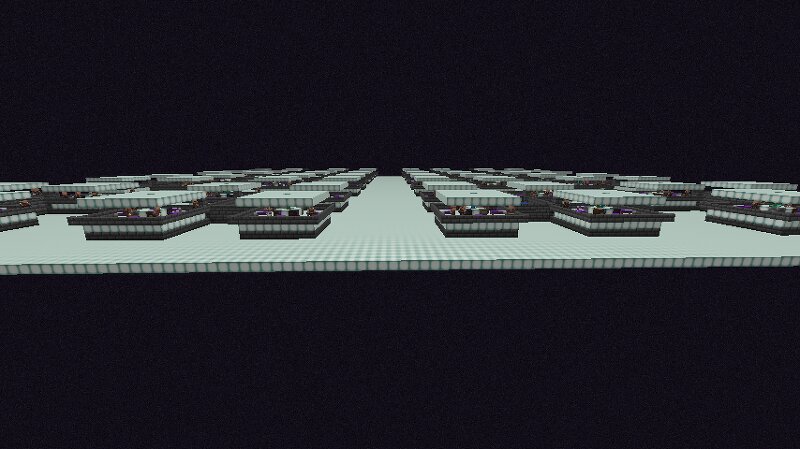
This is The Interdimensional Iron Farm . In this farm we use End Portals to reroute all Iron Golems and their drops to the Overworld. This means the farm itself can be stacked upwards or downwards, side by side, or, placed in multiple areas in The End, not near each other, because all of the portals output to the same place in the Overworld. This is controlled with the /setworldspawn command. Because this is a passive mob farm, the player is not required to afk at the location or anywhere else. To keep the chunks in The End loaded, we use the /forceload command. I could have made the farm much much bigger but I didn't want to make the file size too big. Big or small, all Iron Golems exit the portal to the same location in the Overworld. Exactly. On top of this, unlike many Iron Farms, we're using bubble columns under the zombies to make them bounce, to constantly break their line of sight with villagers so they can get that split second of rest they need to spawn a golem. All you have to do is stand at the kill chamber and watch golems fall from nowhere into the lava pit, or do something else while your chests fill up. And they fill up very fast. If the player uses the portal in Th
Added value
What’s included on this page
Preview, categories, compatibility, and tools on this page — not a bare file mirror.
- Creator
- Hardmuscle
- Source
- Minecraft downloads library on Eaglercraft Studio
- Type
- Minecraft map / world
- Price
- Free download on Eaglercraft Studio
- Curation
- Listed with credit to Hardmuscle · studio preview & install guide
- Compatible with
- Minecraft Java (match version / loader in facts)
- Tags
- Educational
Install guide
How to install this free Minecraft map
Eaglercraft Studio map listing with preview, creator credit, and install steps for Java worlds.
- 1Download the world archive (.zip / .mcworld / schematic) when available.
- 2For Java: extract into your .minecraft/saves folder (or import via your launcher).
- 3Launch Minecraft, select the world, and play. Keep a backup before overwriting saves.
Check any version notes in the facts panel — maps often target a specific Minecraft release.
Related free maps
More curated maps from the same library section.

CraftyFoxe · 761 diamonds · 418 views

CraftyFoxe · 761 diamonds · 339 views

CraftyFoxe · 761 diamonds · 319 views

CraftyFoxe · 761 diamonds · 306 views