
Ivoryfalls Bakehouse
Creator: EcoSMP · 2026-09-26 · Maps · Free on Eaglercraft Studio
Download Ivoryfalls Bakehouse — free Minecraft map. Created by EcoSMP. Tagged amazing, awesome, base, blueprint. Get the world/schematic file when available and explore more free maps on Eaglercraft Studio.
Creator notes
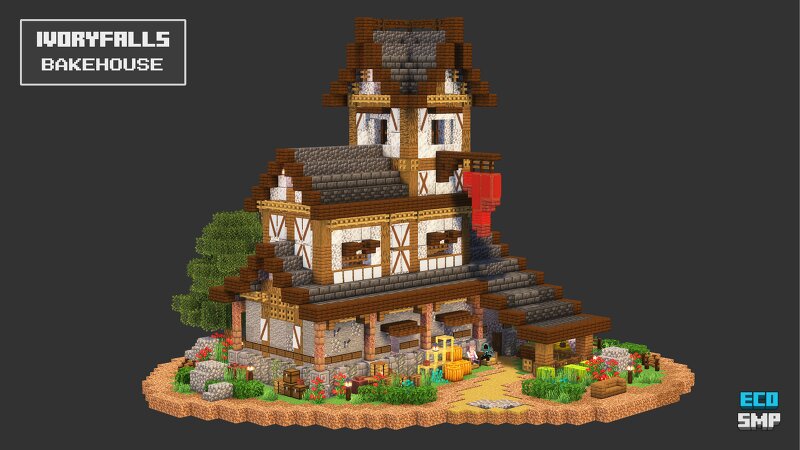
A medieval bakery and butcher shop with living quarters above, a small tower, and landscaped grounds. The main floor contains the shop, with a service counter and several food displays alongside a separate room used for butchering and preparation. A kitchen sits on the landing between the shop and the upper living quarters, which include a combined living and study area with a bedroom above. The tower provides additional storage and lookout space. Outside, landscaped paths and gardens wrap around the building, with covered seating near the entrance, benches and additional seating areas throughout the grounds, and an exterior serving counter and water well at the rear. If you like this build, please give it a diamond above 💙 📥 Downloads & Guides: .schem, .litematic, .mcstructure, and .nbt files Interactive 2D/3D browser guide Build Instructions PDF with 2D/3D views and a materials list Materials list .txt file Build download guide for using the files across different devices Get it as a one-time purchase or as part of Build Benefactor , which grants unlimited access to our growing collection of builds (100+)
Added value
What’s included on this page
Preview, categories, compatibility, and tools on this page — not a bare file mirror.
- Creator
- EcoSMP
- Source
- Minecraft downloads library on Eaglercraft Studio
- Type
- Minecraft map / world
- Price
- Free download on Eaglercraft Studio
- Curation
- Listed with credit to EcoSMP · studio preview & install guide
- Compatible with
- Minecraft Java (match version / loader in facts)
- Tags
- Amazing, Awesome, Base, Blueprint, Build, Building
Install guide
How to install this free Minecraft map
Eaglercraft Studio map listing with preview, creator credit, and install steps for Java worlds.
- 1Download the world archive (.zip / .mcworld / schematic) when available.
- 2For Java: extract into your .minecraft/saves folder (or import via your launcher).
- 3Launch Minecraft, select the world, and play. Keep a backup before overwriting saves.
Check any version notes in the facts panel — maps often target a specific Minecraft release.
Related free maps
More curated maps from the same library section.

CraftyFoxe · 761 diamonds · 418 views

CraftyFoxe · 761 diamonds · 339 views

CraftyFoxe · 761 diamonds · 319 views

CraftyFoxe · 761 diamonds · 306 views