
Jungle Haven Starter Map
Creator: Tofu_QoFu · 2026-09-22 · Maps · Free on Eaglercraft Studio
Download Jungle Haven Starter Map — free Minecraft map. Created by Tofu_QoFu. Tagged land structure, starterbase, survival, vanilla. Get the world/schematic file when available and explore more free maps on Eaglercraft Studio.
Creator notes
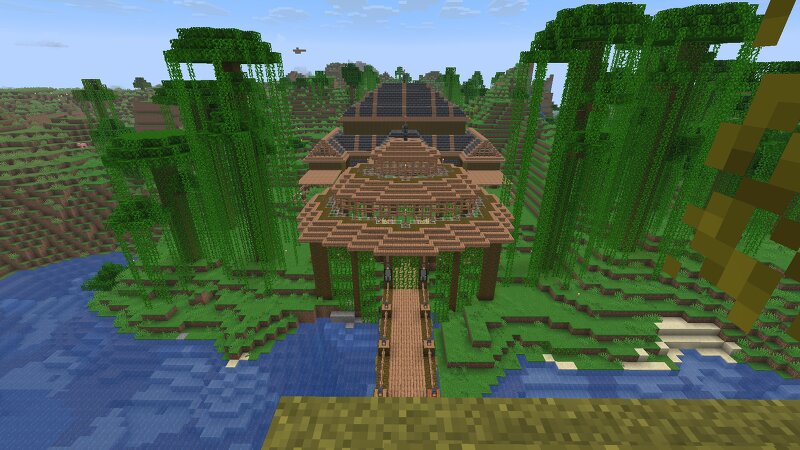
Starter Map for 26.3 - No mods required Welcome to Jungle haven, a handcrafted vanilla starter world designed for players who want to dive straight into survival without mods or setup hassle. Nestled on the border of the windswept savanna and the sparse jungle valley, perfect for builders, adventurers and explorers. The main structure built entirely from vanilla materials; the architecture combines jungle wood and deepslate because "aesthetics" :P. The exterior and interior include, farming plots, storage areas, enchanting station and a nether portal all available to skip the early game progression and get straight into the nitty gritty of crafting and adventuring. Crop Gardens include: Wheat, Carrots, Beetroot, Pumpkins, Melons, Sugar Cane, Cocoa Beans and Bamboo Animal Pens Include: Cows, Sheep, Pigs and Chickens Added Bonus: the nether includes pre-mapped paths leading to each leading to a nether fortress ready for your blaze rod farming needs, with one path going through a Piglin Fortress so be sure to take your gold armour with you.
Added value
What’s included on this page
Preview, categories, compatibility, and tools on this page — not a bare file mirror.
- Creator
- Tofu_QoFu
- Source
- Minecraft downloads library on Eaglercraft Studio
- Type
- Minecraft map / world
- Price
- Free download on Eaglercraft Studio
- Curation
- Listed with credit to Tofu_QoFu · studio preview & install guide
- Compatible with
- Minecraft Java (match version / loader in facts)
- Tags
- Land Structure, Starterbase, Survival, Vanilla
Install guide
How to install this free Minecraft map
Eaglercraft Studio map listing with preview, creator credit, and install steps for Java worlds.
- 1Download the world archive (.zip / .mcworld / schematic) when available.
- 2For Java: extract into your .minecraft/saves folder (or import via your launcher).
- 3Launch Minecraft, select the world, and play. Keep a backup before overwriting saves.
Check any version notes in the facts panel — maps often target a specific Minecraft release.
Related free maps
More curated maps from the same library section.

CraftyFoxe · 761 diamonds · 418 views

CraftyFoxe · 761 diamonds · 339 views

CraftyFoxe · 761 diamonds · 319 views

CraftyFoxe · 761 diamonds · 306 views