
Kingdom of ThirtyFangs
Creator: ThirtyFangs · 2026-09-08 · Maps · Free on Eaglercraft Studio
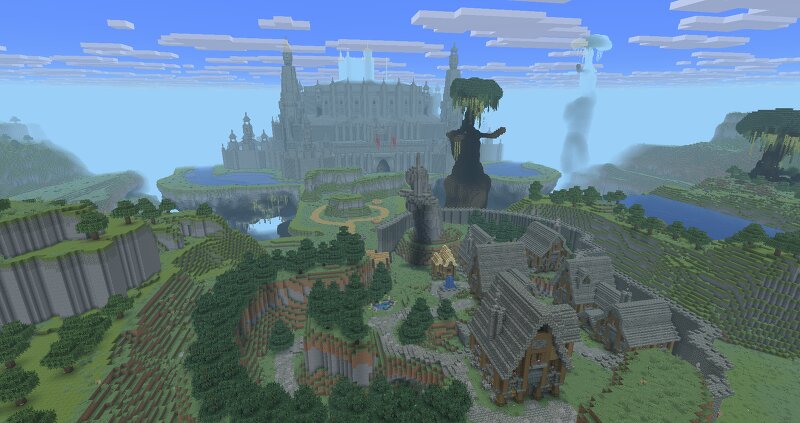
Download Kingdom of ThirtyFangs — free Minecraft map. Created by ThirtyFangs. Tagged castle, town, zelda. Get the world/schematic file when available and explore more free maps on Eaglercraft Studio.
Creator notes
No resource pack required, no mods required. Kingdom of ThirtyFangs is a 26.3 map I'm building in singleplayer featuring custom world gen from More Biomes , the main castle & castle town, & other areas. The map was started on a flat map in 26.2, where the castle was built using world edit & axiom. Then, a landscape was created around the castle, resulting in a 1000x1000 areas. I added lighting settings by adding custom biomes. Using World Painter, I added an ocean around the terraformed area, & then, using chunk editor mod by Miraculixx, the unused chunks near the edge of the new ocean got removed to convert the flat map to a regular world in 26.3, with the custom world gen & vanilla biome blending feature. Then, using the same method, Castle Town got added to the already existing landscape. I've then added 3D elements that I modeled The map features custom guards, new mobs like carnivorous plants, an antigrief for the castle area, working search lights & other things! All the content used can be downloaded here: https://modrinth.com/user/ThirtyFangs
Added value
What’s included on this page
Preview, categories, compatibility, and tools on this page — not a bare file mirror.
- Creator
- ThirtyFangs
- Source
- Minecraft downloads library on Eaglercraft Studio
- Type
- Minecraft map / world
- Price
- Free download on Eaglercraft Studio
- Curation
- Listed with credit to ThirtyFangs · studio preview & install guide
- Compatible with
- Minecraft Java (match version / loader in facts)
- Tags
- Castle, Town, Zelda
Install guide
How to install this free Minecraft map
Eaglercraft Studio map listing with preview, creator credit, and install steps for Java worlds.
- 1Download the world archive (.zip / .mcworld / schematic) when available.
- 2For Java: extract into your .minecraft/saves folder (or import via your launcher).
- 3Launch Minecraft, select the world, and play. Keep a backup before overwriting saves.
Check any version notes in the facts panel — maps often target a specific Minecraft release.
Related free maps
More curated maps from the same library section.

CraftyFoxe · 761 diamonds · 418 views

CraftyFoxe · 761 diamonds · 339 views

CraftyFoxe · 761 diamonds · 319 views

CraftyFoxe · 761 diamonds · 306 views