
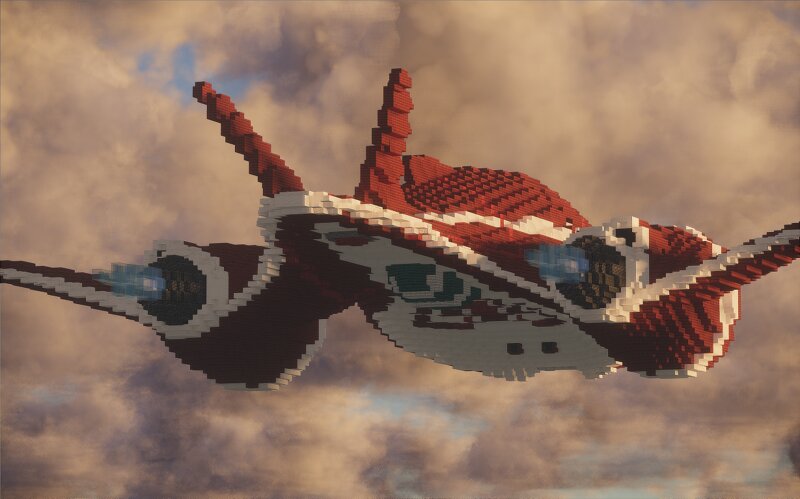
Lilo & Stitch | Jumba's Ship ~1.5:1
Creator: UnluckyDeNviL · 2026-09-06 · Maps · Free on Eaglercraft Studio
Download Lilo & Stitch | Jumba's Ship ~1.5:1 — free Minecraft map. Created by UnluckyDeNviL. Tagged air structure, jumbaship, liloandstich, plane. Get the world/schematic file when available and explore more free maps on Eaglercraft Studio.
Creator notes
Lilo & Stich | Jumba's ship ~1.5:1 Hallo people! As with my previous projects , I spent a long time preparing to build this one—mostly mentally, but also a bit technically in terms of gathering blueprints. To do that, I rewatched every single episode featuring the ship just to catch clean angles: front, side, and top views. However, that still didn't make the job completely easy. I had to rely on my aircraft-building experience, because this project, more than any other, required recreating smooth, aerodynamic shapes. I’m incredibly happy with the final result, and I'm glad that going with the 1.5:1 scale paid off. I realized a long time ago that in Minecraft, it looks way more natural relative to the player than a 1:1 scale. Supporting me will unlock more blueprints and schematics for this and my other builds! See you soon and new builds! ❤️
Added value
What’s included on this page
Preview, categories, compatibility, and tools on this page — not a bare file mirror.
- Creator
- UnluckyDeNviL
- Source
- Minecraft downloads library on Eaglercraft Studio
- Type
- Minecraft map / world
- Price
- Free download on Eaglercraft Studio
- Curation
- Listed with credit to UnluckyDeNviL · studio preview & install guide
- Compatible with
- Minecraft Java (match version / loader in facts)
- Tags
- Air Structure, Jumbaship, Liloandstich, Plane, Space, Spaceship
Install guide
How to install this free Minecraft map
Eaglercraft Studio map listing with preview, creator credit, and install steps for Java worlds.
- 1Download the world archive (.zip / .mcworld / schematic) when available.
- 2For Java: extract into your .minecraft/saves folder (or import via your launcher).
- 3Launch Minecraft, select the world, and play. Keep a backup before overwriting saves.
Check any version notes in the facts panel — maps often target a specific Minecraft release.
Related free maps
More curated maps from the same library section.

CraftyFoxe · 761 diamonds · 418 views

CraftyFoxe · 761 diamonds · 339 views

CraftyFoxe · 761 diamonds · 319 views

CraftyFoxe · 761 diamonds · 306 views