
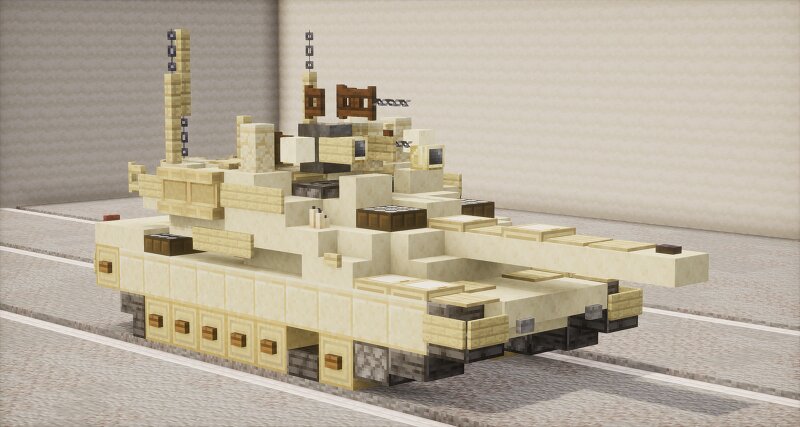
M1A2 SEPv2 Abrams | 1.5:1 scale
Creator: Revos · 2026-09-02 · Maps · Free on Eaglercraft Studio
Download M1A2 SEPv2 Abrams | 1.5:1 scale — free Minecraft map. Created by Revos. Tagged abrams, abramstank, land structure, m1a2. Get the world/schematic file when available and explore more free maps on Eaglercraft Studio.
Creator notes
The M1 Abrams (/ˈeɪbrəmz/) is a third-generation American main battle tank designed by Chrysler Defense (now General Dynamics Land Systems) and named for General Creighton Abrams. Conceived for modern armored ground warfare, it is one of the heaviest tanks in service at nearly 73.6 short tons (66.8 metric tons). It introduced several modern technologies to the United States armored forces, including a multifuel turbine engine, sophisticated Chobham composite armor, a computer fire control system, separate ammunition storage in a blowout compartment, and NBC protection for crew safety. Initial models of the M1 were armed with a 105 mm M68 gun, while later variants feature a license-produced Rheinmetall 120 mm L/44 designated M256. Specifications: Length: 9.77 m / 32.04 ft (18 blocks) (gun forward) 7.93 m / 26.02 ft (12 blocks) (hull length) Width: 3.66 m / 12 ft (5 blocks) Height: 2.44 m / 8 ft (5 blocks) Mass: 57 tonnes Crew: 4 soldiers (Commander, Gunner, Loader, Driver) The download includes a schematic (.schem) of every variant included in this post. The M1A2 SEPv2 comes in a desert tan livery, a plain green livery and a NATO 3-colour camo scheme You may use this build for free
Added value
What’s included on this page
Preview, categories, compatibility, and tools on this page — not a bare file mirror.
- Creator
- Revos
- Source
- Minecraft downloads library on Eaglercraft Studio
- Type
- Minecraft map / world
- Price
- Free download on Eaglercraft Studio
- Curation
- Listed with credit to Revos · studio preview & install guide
- Compatible with
- Minecraft Java (match version / loader in facts)
- Tags
- Abrams, Abramstank, Land Structure, M1a2, M1a2abrams, M1a2sep
Install guide
How to install this free Minecraft map
Eaglercraft Studio map listing with preview, creator credit, and install steps for Java worlds.
- 1Download the world archive (.zip / .mcworld / schematic) when available.
- 2For Java: extract into your .minecraft/saves folder (or import via your launcher).
- 3Launch Minecraft, select the world, and play. Keep a backup before overwriting saves.
Check any version notes in the facts panel — maps often target a specific Minecraft release.
Related free maps
More curated maps from the same library section.

CraftyFoxe · 761 diamonds · 418 views

CraftyFoxe · 761 diamonds · 339 views

CraftyFoxe · 761 diamonds · 319 views

CraftyFoxe · 761 diamonds · 306 views