
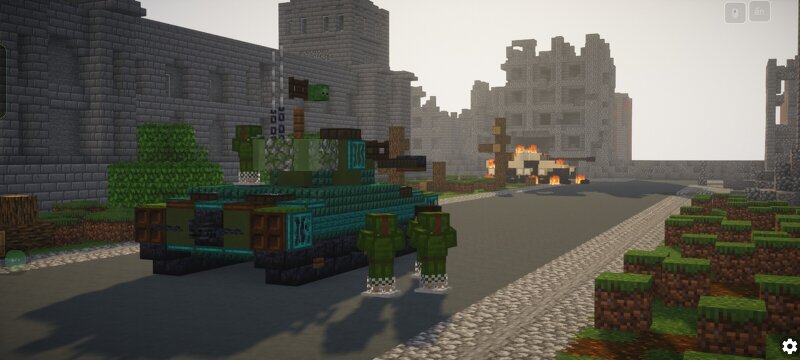
M26 Pershing tank java world war II (scale 1.5:1)
Creator: Astray923 · 2026-09-16 · Maps · Free on Eaglercraft Studio
Download M26 Pershing tank java world war II (scale 1.5:1) — free Minecraft map. Created by Astray923. Tagged army, building, diomara, diomaraminecraft. Get the world/schematic file when available and explore more free maps on Eaglercraft Studio.
Creator notes
Actually, I didn't intend to make the M26 Pershing vs. Panther picture, but it's really popular and I like it. M26 Pershing If you're wondering, the designations "T" and "M" in the US military refer to the prototype as T, while the final version is M, and models like T28, T29, T34, etc., are different from the M version. But I would still include it in the M series, or rather, Patton series, from M41 upwards. It's quite funny, I often play with the T34, but I rarely really look at it until I'm building a tank. Also, the model in the game has war-themed patterns and details, while the model I built is for display purposes, with fewer patterns and a completely clean design. When building the M26, I took the M4A3 (76) W turret and enlarged it horizontally to 3 blocks instead of 2 blocks of the M4. Once I got used to the designations for American tanks, I found them quite easy, but I'm still more familiar with the designations for Soviet/Russian tanks.
Added value
What’s included on this page
Preview, categories, compatibility, and tools on this page — not a bare file mirror.
- Creator
- Astray923
- Source
- Minecraft downloads library on Eaglercraft Studio
- Type
- Minecraft map / world
- Price
- Free download on Eaglercraft Studio
- Curation
- Listed with credit to Astray923 · studio preview & install guide
- Compatible with
- Minecraft Java (match version / loader in facts)
- Tags
- Army, Building, Diomara, Diomaraminecraft, M26, M26pershing
Install guide
How to install this free Minecraft map
Eaglercraft Studio map listing with preview, creator credit, and install steps for Java worlds.
- 1Download the world archive (.zip / .mcworld / schematic) when available.
- 2For Java: extract into your .minecraft/saves folder (or import via your launcher).
- 3Launch Minecraft, select the world, and play. Keep a backup before overwriting saves.
Check any version notes in the facts panel — maps often target a specific Minecraft release.
Related free maps
More curated maps from the same library section.

CraftyFoxe · 761 diamonds · 418 views

CraftyFoxe · 761 diamonds · 339 views

CraftyFoxe · 761 diamonds · 319 views

CraftyFoxe · 761 diamonds · 306 views