
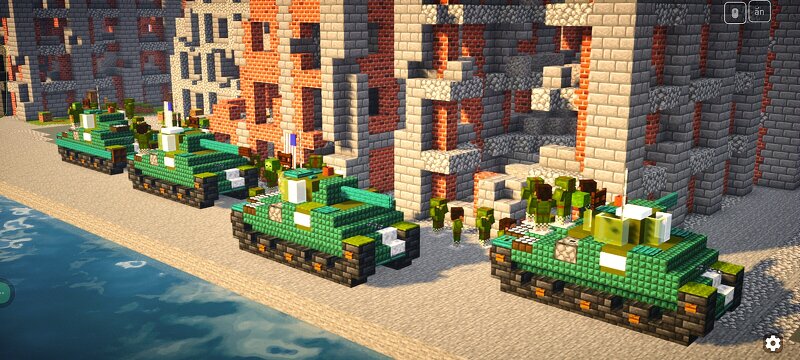
M4A3 Tank Variant from World War II (scale 1.5:1)
Creator: Astray923 · 2026-09-16 · Maps · Free on Eaglercraft Studio
Download M4A3 Tank Variant from World War II (scale 1.5:1) — free Minecraft map. Created by Astray923. Tagged 75w, 76w, army, battle. Get the world/schematic file when available and explore more free maps on Eaglercraft Studio.
Creator notes
I think I should make a map of the three T-34/Pz.IV/M4A2 tanks I acquired for an exhibition, shouldn't I? To be honest, even though I'm a builder, I can only build tanks, airplanes, or other military equipment, but I don't know how to build houses or residential areas. Yeah, because I'm pretty bad at geometry. M4A3 (75) W M4A3 (76) W M4A3E2 M4A3 (105) Unless you look closely, you probably wouldn't know the difference between the M4A2 large hatch and the M4A3, right? The biggest difference is the angle at the rear of the vehicle and its exhaust pipe; actually, the internal mechanism is also different, but Minecraft can't accurately simulate the inside of the crew compartment.So, it wouldn't be surprising if you considered that I only made a few modifications to the M4A2 to create the M4A3. If you're wondering why I didn't make a full variant of the Sherman series, but only 2-5 models, it's because I saved those for the Update series, and besides, I still had to take my girlfriend to the beach.
Added value
What’s included on this page
Preview, categories, compatibility, and tools on this page — not a bare file mirror.
- Creator
- Astray923
- Source
- Minecraft downloads library on Eaglercraft Studio
- Type
- Minecraft map / world
- Price
- Free download on Eaglercraft Studio
- Curation
- Listed with credit to Astray923 · studio preview & install guide
- Compatible with
- Minecraft Java (match version / loader in facts)
- Tags
- 75w, 76w, Army, Battle, Battlefield, Building
Install guide
How to install this free Minecraft map
Eaglercraft Studio map listing with preview, creator credit, and install steps for Java worlds.
- 1Download the world archive (.zip / .mcworld / schematic) when available.
- 2For Java: extract into your .minecraft/saves folder (or import via your launcher).
- 3Launch Minecraft, select the world, and play. Keep a backup before overwriting saves.
Check any version notes in the facts panel — maps often target a specific Minecraft release.
Related free maps
More curated maps from the same library section.

CraftyFoxe · 761 diamonds · 418 views

CraftyFoxe · 761 diamonds · 339 views

CraftyFoxe · 761 diamonds · 319 views

CraftyFoxe · 761 diamonds · 306 views