
Medieval City of Sal'Aem
Creator: T17N · 2026-09-27 · Maps · Free on Eaglercraft Studio
Download Medieval City of Sal'Aem — free Minecraft map. Created by T17N. Tagged city, land structure, massivetree, medieval. Get the world/schematic file when available and explore more free maps on Eaglercraft Studio.
Creator notes
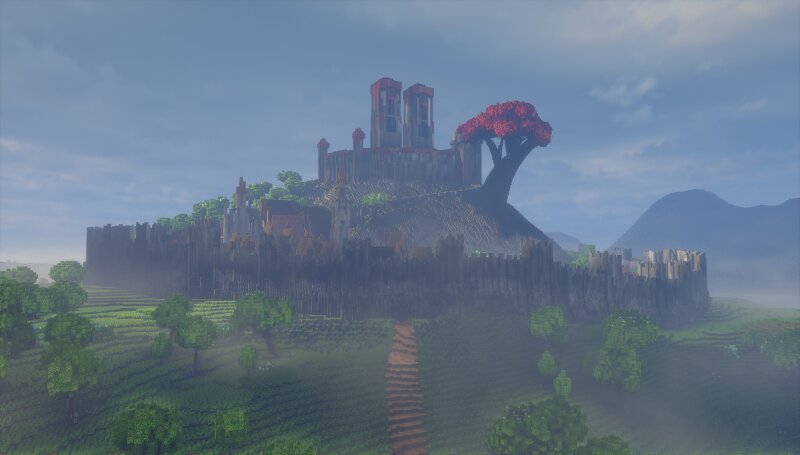
East of Atera lies a mountain range untouched by war. Hidden between its towering peaks stands a forgotten town, built upon a solitary mountain and guarded by two colossal towers. At its heart grows a massive blood tree, its crimson branches overlooking the silent streets below. There are no people here. Only the Ashens. Statues formed from ancient ash, standing motionless throughout the town. But they are not statues. They watch. They listen. And when threatened, they can become dust—slipping into the bodies of intruders and choking them from within. Then, from beneath the blood tree, a voice echoes across the mountains. A speech in the ancient tongue of Sallean. A declaration. No army will cross these peaks. No enemy will breach these walls. No threat will reach the empire beyond them. The mountains are the border. The Ashens are its guardians. And the blood tree is always watching. Please note: Atera is designed first and foremost as a cinematic world, with an emphasis on storytelling, atmosphere, and exploration. As a result, some interiors may be inaccessible or unfinished, and certain areas may not be fully polished from a gameplay perspective. Rather than a traditional adven
Added value
What’s included on this page
Preview, categories, compatibility, and tools on this page — not a bare file mirror.
- Creator
- T17N
- Source
- Minecraft downloads library on Eaglercraft Studio
- Type
- Minecraft map / world
- Price
- Free download on Eaglercraft Studio
- Curation
- Listed with credit to T17N · studio preview & install guide
- Compatible with
- Minecraft Java (match version / loader in facts)
- Tags
- City, Land Structure, Massivetree, Medieval, Tree
Install guide
How to install this free Minecraft map
Eaglercraft Studio map listing with preview, creator credit, and install steps for Java worlds.
- 1Download the world archive (.zip / .mcworld / schematic) when available.
- 2For Java: extract into your .minecraft/saves folder (or import via your launcher).
- 3Launch Minecraft, select the world, and play. Keep a backup before overwriting saves.
Check any version notes in the facts panel — maps often target a specific Minecraft release.
Related free maps
More curated maps from the same library section.

CraftyFoxe · 761 diamonds · 418 views

CraftyFoxe · 761 diamonds · 339 views

CraftyFoxe · 761 diamonds · 319 views

CraftyFoxe · 761 diamonds · 306 views