
Medieval Kingdom Builder Pack – 25+ Gothic & Fantasy Minecraft Builds
Creator: Frost_Beer · 2026-09-27 · Maps · Free on Eaglercraft Studio
Download Medieval Kingdom Builder Pack – 25+ Gothic & Fantasy Minecraft Builds — free Minecraft map. Created by Frost_Beer. Tagged assets, building, buildpack, cart. Get the world/schematic file when available and explore more free maps on Eaglercraft Studio.
Creator notes
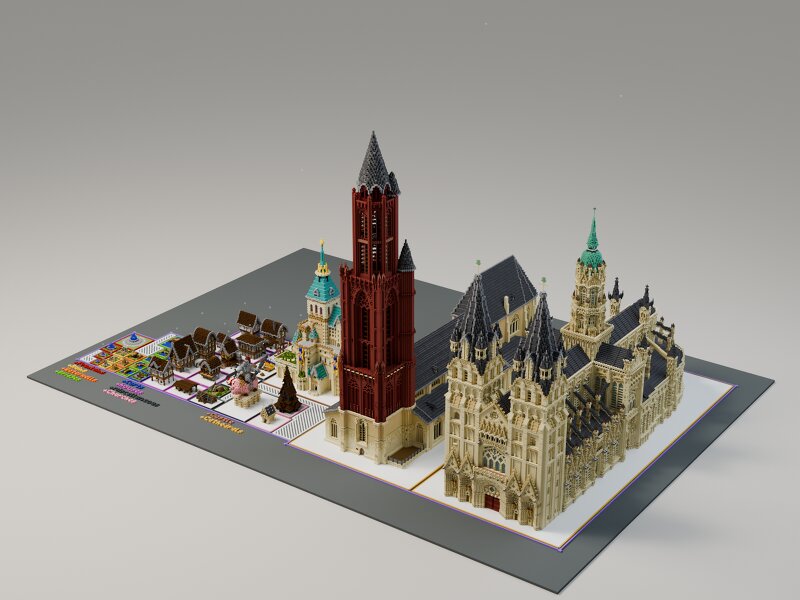
Build your own medieval kingdom without spending hundreds of hours designing every structure from scratch. This pack contains a collection of highly detailed medieval and gothic Minecraft builds , ranging from smaller decorative assets and houses to huge landmark structures such as churches, towers and a massive gothic cathedral. Every build can be explored together in the included showcase world or imported individually into your own projects using the supplied Litematic files or world file . Perfect for: Medieval towns & cities Fantasy kingdoms RPG / survival servers Spawn areas Adventure maps Creative building projects Included: 🏰 Large medieval & gothic structures ⛪ Detailed churches and cathedral builds 🏘️ Medieval houses and smaller town assets 🗼 Towers and landmark buildings 🌿 Decorative / environment assets 📦 Full Minecraft world download Price: 6.5 euro If you have any questions or would like to request something feel free to send a message my way! Kind regards and until next time Frost_Beer
Added value
What’s included on this page
Preview, categories, compatibility, and tools on this page — not a bare file mirror.
- Creator
- Frost_Beer
- Source
- Minecraft downloads library on Eaglercraft Studio
- Type
- Minecraft map / world
- Price
- Free download on Eaglercraft Studio
- Curation
- Listed with credit to Frost_Beer · studio preview & install guide
- Compatible with
- Minecraft Java (match version / loader in facts)
- Tags
- Assets, Building, Buildpack, Cart, Castle, Cathedral
Install guide
How to install this free Minecraft map
Eaglercraft Studio map listing with preview, creator credit, and install steps for Java worlds.
- 1Download the world archive (.zip / .mcworld / schematic) when available.
- 2For Java: extract into your .minecraft/saves folder (or import via your launcher).
- 3Launch Minecraft, select the world, and play. Keep a backup before overwriting saves.
Check any version notes in the facts panel — maps often target a specific Minecraft release.
Related free maps
More curated maps from the same library section.

CraftyFoxe · 761 diamonds · 418 views

CraftyFoxe · 761 diamonds · 339 views

CraftyFoxe · 761 diamonds · 319 views

CraftyFoxe · 761 diamonds · 306 views