
Medieval Lighthouse House – Minecraft Schematic
Creator: NovaCraftG · 2026-09-27 · Maps · Free on Eaglercraft Studio
Download Medieval Lighthouse House – Minecraft Schematic — free Minecraft map. Created by NovaCraftG. Tagged other. Get the world/schematic file when available and explore more free maps on Eaglercraft Studio.
Creator notes
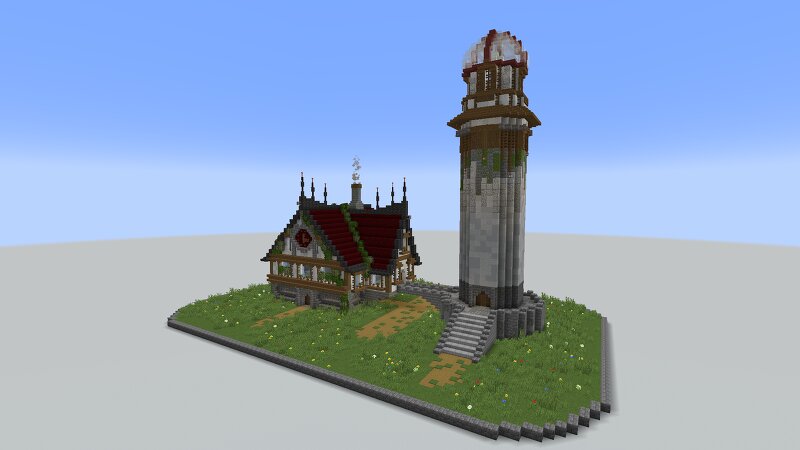
Bring a unique medieval landmark to your Minecraft world with this detailed Medieval Lighthouse House! 🏰🌊 Designed with a tall stone lighthouse tower and a beautiful medieval residence, this build combines classic medieval architecture, strong stonework, dark red roofing, wooden details, and a cozy fantasy atmosphere. ✨ Features: * 🏰 Detailed medieval house & lighthouse tower * 🗼 Tall decorative lighthouse structure * 🪵 Stone & wood medieval detailing * 🟥 Dark red roof design * 🌿 Vines, flowers & natural exterior details * 🛤️ Custom paths and stone landscaping * 🔥 Decorative chimney with smoke * ⛏️ Survival-friendly exterior * 📐 Carefully detailed Minecraft-style construction Interior: The interior is empty and fully customizable, giving you complete freedom to design the rooms however you like. 🛋️✨ 📦 Compatible with: Minecraft Java Edition WorldEdit Litematica Schematic Perfect for medieval villages, coastal towns, fantasy kingdoms, or as a unique centerpiece for your survival world. 🌊🏰 Build it. Customize it. Make it yours. ❤️
Added value
What’s included on this page
Preview, categories, compatibility, and tools on this page — not a bare file mirror.
- Creator
- NovaCraftG
- Source
- Minecraft downloads library on Eaglercraft Studio
- Type
- Minecraft map / world
- Price
- Free download on Eaglercraft Studio
- Curation
- Listed with credit to NovaCraftG · studio preview & install guide
- Compatible with
- Minecraft Java (match version / loader in facts)
- Tags
- Other
Install guide
How to install this free Minecraft map
Eaglercraft Studio map listing with preview, creator credit, and install steps for Java worlds.
- 1Download the world archive (.zip / .mcworld / schematic) when available.
- 2For Java: extract into your .minecraft/saves folder (or import via your launcher).
- 3Launch Minecraft, select the world, and play. Keep a backup before overwriting saves.
Check any version notes in the facts panel — maps often target a specific Minecraft release.
Related free maps
More curated maps from the same library section.

CraftyFoxe · 761 diamonds · 418 views

CraftyFoxe · 761 diamonds · 339 views

CraftyFoxe · 761 diamonds · 319 views

CraftyFoxe · 761 diamonds · 306 views