
Midgar
Creator: onmi1855 · 2026-09-25 · Maps · Free on Eaglercraft Studio
Download Midgar — free Minecraft map. Created by onmi1855. Tagged 3d art. Get the world/schematic file when available and explore more free maps on Eaglercraft Studio.
Creator notes
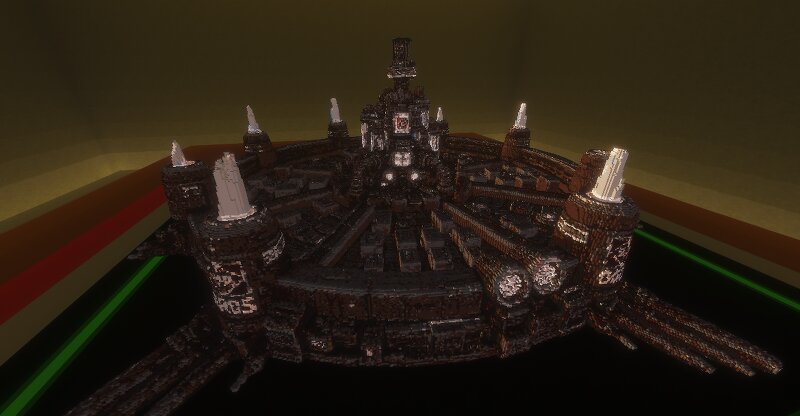
This is a Midgar-inspired build created for MobCrafter, and it can also be used as a schematic. The main focus of this build is the external appearance and overall visual recreation. It works well as a large display piece, a themed build, or a diorama-style structure like shown in the screenshots. Important note: Although this build can be used as a schematic, it is primarily made for visual appearance. The interior and internal building layout are not fully designed or configured. Because of that, I recommend using it in one of the following ways: - renovate and customize the inside yourself - use it mainly as an exterior build - place it as a diorama or showcase structure like in the screenshots This structure was created using a custom tool. The author manually adjusts the colors, scale, block palette, and other settings for Minecraft based on a original 3D model. Includes: - MobCrafter JSON file - Schematic file Best for: - display builds - themed worlds - Final Fantasy-inspired projects - diorama presentation - custom renovation projects
Added value
What’s included on this page
Preview, categories, compatibility, and tools on this page — not a bare file mirror.
- Creator
- onmi1855
- Source
- Minecraft downloads library on Eaglercraft Studio
- Type
- Minecraft map / world
- Price
- Free download on Eaglercraft Studio
- Curation
- Listed with credit to onmi1855 · studio preview & install guide
- Compatible with
- Minecraft Java (match version / loader in facts)
- Tags
- 3d Art
Install guide
How to install this free Minecraft map
Eaglercraft Studio map listing with preview, creator credit, and install steps for Java worlds.
- 1Download the world archive (.zip / .mcworld / schematic) when available.
- 2For Java: extract into your .minecraft/saves folder (or import via your launcher).
- 3Launch Minecraft, select the world, and play. Keep a backup before overwriting saves.
Check any version notes in the facts panel — maps often target a specific Minecraft release.
Related free maps
More curated maps from the same library section.

CraftyFoxe · 761 diamonds · 418 views

CraftyFoxe · 761 diamonds · 339 views

CraftyFoxe · 761 diamonds · 319 views

CraftyFoxe · 761 diamonds · 306 views