
MINECRAFT SERVER - RAMSET TOWN
Creator: spyrogyro · 2026-09-01 · Maps · Free on Eaglercraft Studio
Download MINECRAFT SERVER - RAMSET TOWN — free Minecraft map. Created by spyrogyro. Tagged other. Get the world/schematic file when available and explore more free maps on Eaglercraft Studio.
Creator notes
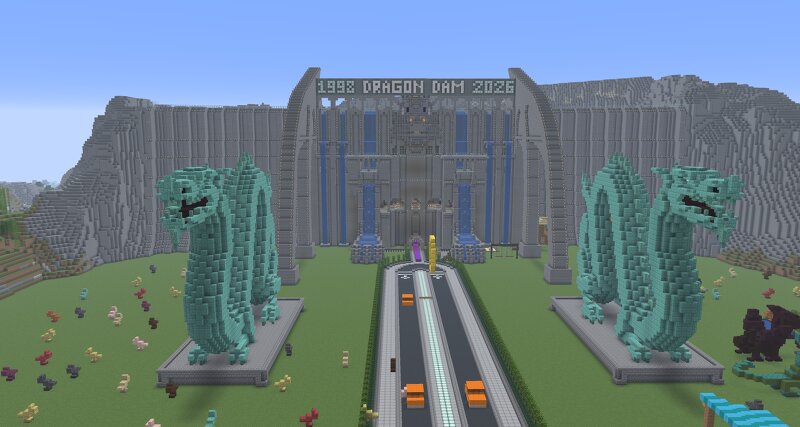
Welcome to the official home of Ramset Town ! Ramset Town is a grand, fully roleplay-focused dragon city built from the ground up on my very first Minecraft server. This project is extremely close to my heart—it represents endless hours of passion, imagination, and careful building to bring a true dragon sanctuary to life. Whether you are here to explore the dragon architecture, participate in peaceful roleplay, or join our growing community, we welcome you to experience this world with us! Server Guidelines & Community Rules To keep Ramset Town a safe, fun, and inspiring place for everyone, we ask all players to strictly follow these core rules: Strict No-Griefing Policy: Ramset Town is protected and owned by the creator SPYRO_GYRO. Any form of griefing, stealing, unwanted editing, or destruction of structures, terrain, or builds will result in an immediate and permanent ban. Respect the Builds: Please treat every structure with care. If you are participating in roleplay, build only in designated areas and leave existing landmarks untouched. Friendly & Safe Environment: Respect fellow players and maintain a welcoming, creative atmosphere at all times. Thank you for helping us pres
Added value
What’s included on this page
Preview, categories, compatibility, and tools on this page — not a bare file mirror.
- Creator
- spyrogyro
- Source
- Minecraft downloads library on Eaglercraft Studio
- Type
- Minecraft map / world
- Price
- Free download on Eaglercraft Studio
- Curation
- Listed with credit to spyrogyro · studio preview & install guide
- Compatible with
- Minecraft Java (match version / loader in facts)
- Tags
- Other
Install guide
How to install this free Minecraft map
Eaglercraft Studio map listing with preview, creator credit, and install steps for Java worlds.
- 1Download the world archive (.zip / .mcworld / schematic) when available.
- 2For Java: extract into your .minecraft/saves folder (or import via your launcher).
- 3Launch Minecraft, select the world, and play. Keep a backup before overwriting saves.
Check any version notes in the facts panel — maps often target a specific Minecraft release.
Related free maps
More curated maps from the same library section.

CraftyFoxe · 761 diamonds · 418 views

CraftyFoxe · 761 diamonds · 339 views

CraftyFoxe · 761 diamonds · 319 views

CraftyFoxe · 761 diamonds · 306 views