
Mitsuki / Cherry Winter Village
Creator: Muey · 2026-09-14 · Maps · Free on Eaglercraft Studio
Download Mitsuki / Cherry Winter Village — free Minecraft map. Created by Muey. Tagged other. Get the world/schematic file when available and explore more free maps on Eaglercraft Studio.
Creator notes
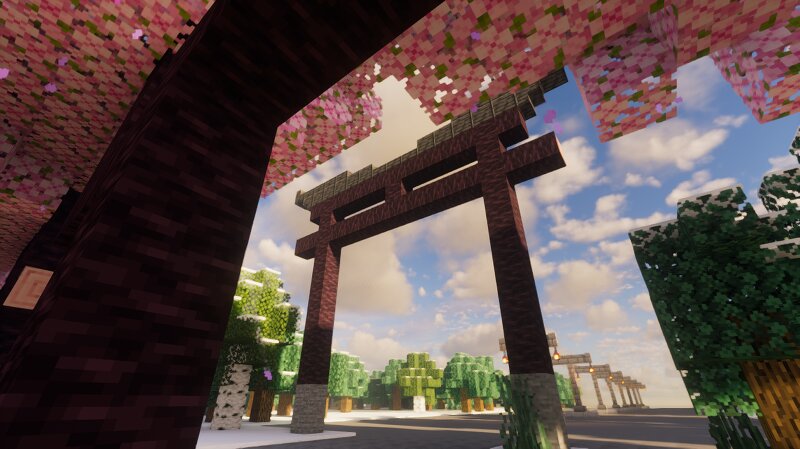
Hewwo internet. Today I will share one of my saves to u all. Version: Forge 1.20.1 Created date: 01 July 2026 Mods used (contains) in the world: Immersive Engineering (IE) Strongly recommended to download the mod in the list first before play the world! !!!Attention!!! I heavily recommend u enable ur favorite shaders, so u can enjoy the view especially heavy shaders where it has immersive lightning, shadows, etc. But, if ur device can't run shaders. I wish u have a decent PC with beefy specs! What is this world? A traditional "Japanese" village map set in winter with 6 villages across the world (3 main villages and 3 small villages) with cherry trees at the main villages area and a small village where u will spawn for the first time. There's a big lake in the middle with river that connects the lake. It's not just a ordinary village, I put a lot of time builds and planting cherry trees on cobblestone pathway left & right side and find best spot to put lanterns on each tree, so when sunset, it'll be mesmerizing to see. Other name of this world is Cherry Winter Village, cuz of many cherry trees. Why is there two Mitsukis? Ok, if u confuse which one to download. Mitsuki.rar is the ori
Added value
What’s included on this page
Preview, categories, compatibility, and tools on this page — not a bare file mirror.
- Creator
- Muey
- Source
- Minecraft downloads library on Eaglercraft Studio
- Type
- Minecraft map / world
- Price
- Free download on Eaglercraft Studio
- Curation
- Listed with credit to Muey · studio preview & install guide
- Compatible with
- Minecraft Java (match version / loader in facts)
- Tags
- Other
Install guide
How to install this free Minecraft map
Eaglercraft Studio map listing with preview, creator credit, and install steps for Java worlds.
- 1Download the world archive (.zip / .mcworld / schematic) when available.
- 2For Java: extract into your .minecraft/saves folder (or import via your launcher).
- 3Launch Minecraft, select the world, and play. Keep a backup before overwriting saves.
Check any version notes in the facts panel — maps often target a specific Minecraft release.
Related free maps
More curated maps from the same library section.

CraftyFoxe · 761 diamonds · 418 views

CraftyFoxe · 761 diamonds · 339 views

CraftyFoxe · 761 diamonds · 319 views

CraftyFoxe · 761 diamonds · 306 views