
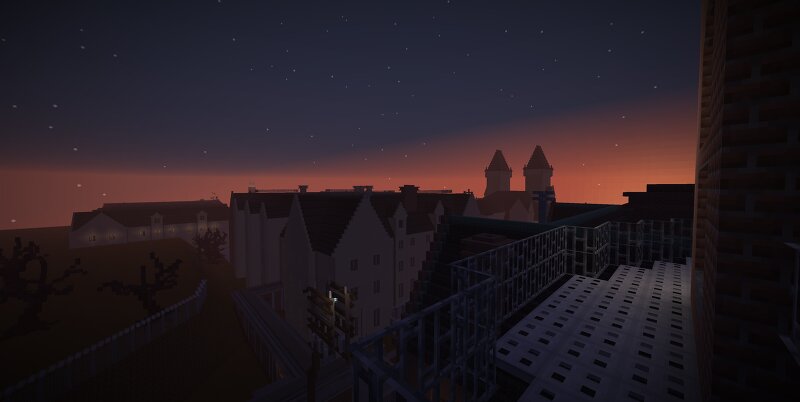
Mount Massive Asylum from the 2013 Survival Horror Game “Outlast”
Creator: AgainstTheMachine2 · 2026-09-12 · Maps · Free on Eaglercraft Studio
Download Mount Massive Asylum from the 2013 Survival Horror Game “Outlast” — free Minecraft map. Created by AgainstTheMachine2. Tagged mentalhospital, mountmassiveasylum, other, outlast. Get the world/schematic file when available and explore more free maps on Eaglercraft Studio.
Creator notes
A project started in November of 2021, I am striving to complete the most accurate recreation of Mount Massive Asylum from the 2013 survival horror game, Outlast, in Minecraft to date. Although not 100% complete at the moment, this current version of the map contains every above ground building and outdoor space from both Outlast and its Whistleblower DLC (excluding the Sewers and Underground Lab). The Administration Block, Male Ward, Female Ward, Prison Block, Male Vocational Block, Female Vocational Block, Hospital, Courtyard, Recreation Area, and Drying Ground are all represented here in a scale approximately 3:1. This map also features no damage and so everything has been ‘repaired’, and is supposed to take place in an alternate universe where a less evil company purchases the asylum and restores it to much of its former glory. Lastly, a big thanks to everyone’s support over the last five years, especially those who have been around since the very beginning. Happy exploring!
Added value
What’s included on this page
Preview, categories, compatibility, and tools on this page — not a bare file mirror.
- Creator
- AgainstTheMachine2
- Source
- Minecraft downloads library on Eaglercraft Studio
- Type
- Minecraft map / world
- Price
- Free download on Eaglercraft Studio
- Curation
- Listed with credit to AgainstTheMachine2 · studio preview & install guide
- Compatible with
- Minecraft Java (match version / loader in facts)
- Tags
- Mentalhospital, Mountmassiveasylum, Other, Outlast
Install guide
How to install this free Minecraft map
Eaglercraft Studio map listing with preview, creator credit, and install steps for Java worlds.
- 1Download the world archive (.zip / .mcworld / schematic) when available.
- 2For Java: extract into your .minecraft/saves folder (or import via your launcher).
- 3Launch Minecraft, select the world, and play. Keep a backup before overwriting saves.
Check any version notes in the facts panel — maps often target a specific Minecraft release.
Related free maps
More curated maps from the same library section.

CraftyFoxe · 761 diamonds · 418 views

CraftyFoxe · 761 diamonds · 339 views

CraftyFoxe · 761 diamonds · 319 views

CraftyFoxe · 761 diamonds · 306 views