
🏥 Mount Massive Asylum: My Personal Vision of Outlast
Creator: Kowal_96 · 2026-09-13 · Maps · Free on Eaglercraft Studio
Download 🏥 Mount Massive Asylum: My Personal Vision of Outlast — free Minecraft map. Created by Kowal_96. Tagged asylum, castle, creepy, custom. Get the world/schematic file when available and explore more free maps on Eaglercraft Studio.
Creator notes
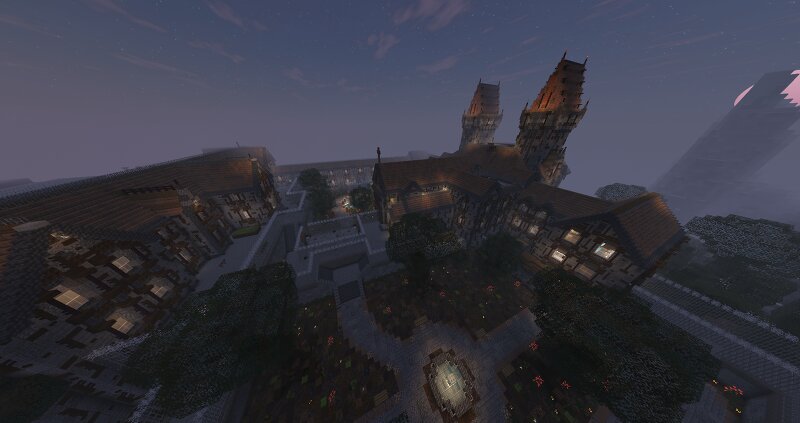
👋 Hello everyone, I am sharing my 17th project on this platform: Mount Massive Asylum from Outlast. This build is my own custom, personal recreation of the iconic, terrifying asylum nestled deep within the mountains. The main focus of this project was to capture the dark, eerie, and claustrophobic atmosphere of the horror game while adding my own unique architectural touch. ⛰️ The centerpiece of the map is the colossal facade of the asylum and its looming mountain backdrop. The main building features towering stone spires, heavily detailed dark stone walls, and dimly lit windows that create a spine-chilling silhouette against the night sky, giving you a sense of dread before you even step closer. 🏰 The architecture relies on a dark gothic structure combined with an institutional, imposing layout that perfectly brings the lore of the survival horror realm to life. Please note that this is a personal, autorski project – it is not an exact 1:1 replica of the game's map, but rather my own interpretation of how Mount Massive should look in the world of blocks. 🎮 As a builder, my priority was creating a beautiful backdrop and an epic environment for exploration. This map features a parti
Added value
What’s included on this page
Preview, categories, compatibility, and tools on this page — not a bare file mirror.
- Creator
- Kowal_96
- Source
- Minecraft downloads library on Eaglercraft Studio
- Type
- Minecraft map / world
- Price
- Free download on Eaglercraft Studio
- Curation
- Listed with credit to Kowal_96 · studio preview & install guide
- Compatible with
- Minecraft Java (match version / loader in facts)
- Tags
- Asylum, Castle, Creepy, Custom, Gothic, Horror
Install guide
How to install this free Minecraft map
Eaglercraft Studio map listing with preview, creator credit, and install steps for Java worlds.
- 1Download the world archive (.zip / .mcworld / schematic) when available.
- 2For Java: extract into your .minecraft/saves folder (or import via your launcher).
- 3Launch Minecraft, select the world, and play. Keep a backup before overwriting saves.
Check any version notes in the facts panel — maps often target a specific Minecraft release.
Related free maps
More curated maps from the same library section.

CraftyFoxe · 761 diamonds · 418 views

CraftyFoxe · 761 diamonds · 339 views

CraftyFoxe · 761 diamonds · 319 views

CraftyFoxe · 761 diamonds · 306 views