
🏔️ Mountain Realm
Creator: Nsgmae23 · 2026-09-17 · Maps · Free on Eaglercraft Studio
Download 🏔️ Mountain Realm — free Minecraft map. Created by Nsgmae23. Tagged 10k, buildermap, creative, customterrain. Get the world/schematic file when available and explore more free maps on Eaglercraft Studio.
Creator notes
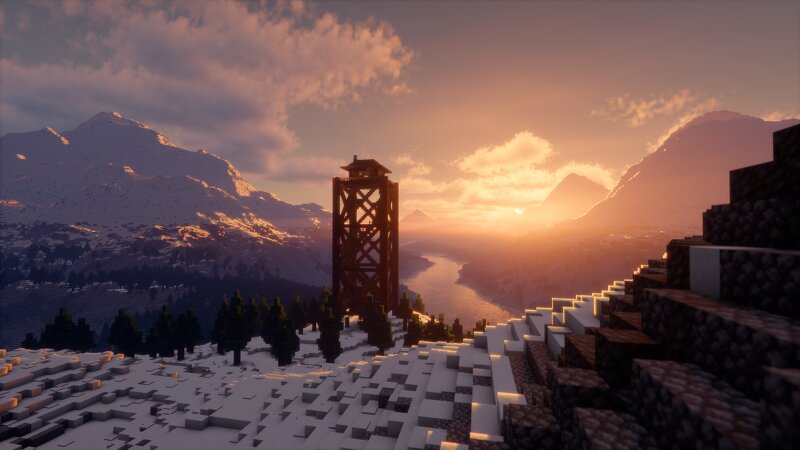
🏔️ Mountain Realm | 10k x 10k Massive Custom Terrain (1.21+) Welcome to Mountain Realm , a vast and majestic landscape spanning over 10,000 x 10,000 blocks ! Crafted with precision using WorldPainter , this map features dramatic snow-capped mountain ranges, sweeping pine forests, winding river valleys, and a atmospheric wooden watchtower overlook. Designed as an ultimate open canvas for builders and creators , Mountain Realm gives you total freedom. Whether you want to build a sprawling medieval kingdom, a cozy mountain village, a high-fantasy fortress, or launch an epic RPG project—this world is yours to shape. ✨ Features 🗺️ Massive World Size: Huge 10,000 x 10,000 block canvas ready for endless exploration and building. 🏔️ Realistic Terrains: Towering snowy peaks, deep valley basins, and smooth natural slopes. 🌲 Custom Vegetation & Biomes: Hand-sculpted forests featuring custom pine trees and immersive terrain blending. 🌊 Winding River Systems: Grand rivers traversing through dense forests and open plains. 🏰 Builder Friendly: Perfect environment for Creative builds, custom servers, cinematic showcase. 🏰 Pure Terrain Map : This map includes custom terrain only—no pre-built structu
Added value
What’s included on this page
Preview, categories, compatibility, and tools on this page — not a bare file mirror.
- Creator
- Nsgmae23
- Source
- Minecraft downloads library on Eaglercraft Studio
- Type
- Minecraft map / world
- Price
- Free download on Eaglercraft Studio
- Curation
- Listed with credit to Nsgmae23 · studio preview & install guide
- Compatible with
- Minecraft Java (match version / loader in facts)
- Tags
- 10k, Buildermap, Creative, Customterrain, Forest, Mountains
Install guide
How to install this free Minecraft map
Eaglercraft Studio map listing with preview, creator credit, and install steps for Java worlds.
- 1Download the world archive (.zip / .mcworld / schematic) when available.
- 2For Java: extract into your .minecraft/saves folder (or import via your launcher).
- 3Launch Minecraft, select the world, and play. Keep a backup before overwriting saves.
Check any version notes in the facts panel — maps often target a specific Minecraft release.
Related free maps
More curated maps from the same library section.

CraftyFoxe · 761 diamonds · 418 views

CraftyFoxe · 761 diamonds · 339 views

CraftyFoxe · 761 diamonds · 319 views

CraftyFoxe · 761 diamonds · 306 views